Message Templates
Message templates define the default email subject and body used by B2Output when distributing documents. The Language ID is the key used to look up the correct template — typically it matches the language code sent by the ERP system (for example, EN, DE, FR). When B2Output distributes a document, it selects the template whose Language ID matches the recipient's language setting.
Templates can be written as plain text or HTML.
List Templates
Open Configuration → Message to view all configured message templates.

The list shows each template's Language ID, language, and whether it is configured as HTML.
Create or Edit a Template
Click + Language Message to create a new template, or Edit to modify an existing one.
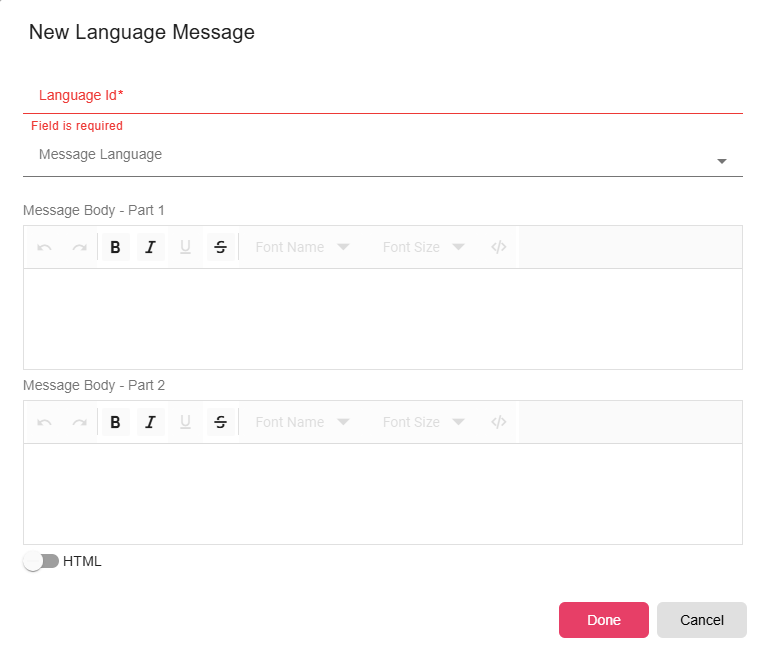
| Field | Description |
|---|---|
| Language ID | A unique identifier for this template. |
| Language | The display language for this template. |
| Message Body | The email body text. Supports property expressions. |
| HTML | Toggle on if the message body uses HTML formatting. When enabled, recipients receive a rich-text email instead of plain text. |
Fallback Behavior
If B2Output cannot find a template matching the recipient's language, it falls back to the template configured in the individual report settings. If no per-report template exists, the distribution uses the default message template.
Notes
- Keep Language IDs consistent with what your ERP sends. A mismatch causes B2Output to fall back to defaults.
- HTML templates support all standard HTML email formatting. Test across major email clients (Outlook, Gmail) to verify rendering.