Email Groups
Email groups are reusable recipient lists used for email distribution across workflows and reports. Instead of hardcoding email addresses in individual configurations, you define groups once in Configuration and reference them by name — making it easy to update distribution lists without changing individual settings.
Each group contains one or more contacts with an email address. Associating a group with a company is optional and can be used to scope distribution to company-specific recipients.
List Groups
Open Configuration → Email Groups to view all groups in the current workspace.
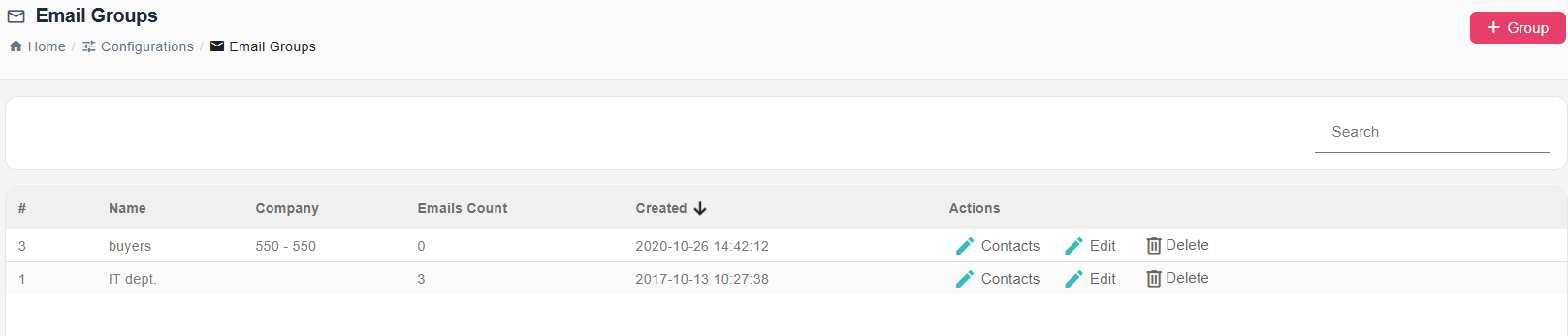
From this page you can:
- Create a new group
- Edit an existing group's name or description
- Delete a group
- Manage contacts in a group by clicking the Contacts link on its row
Create or Edit a Group
Click + Group to create a new group, or Edit on an existing row to update it.
| Field | Description |
|---|---|
| Group Name | A descriptive name for the group (for example, "Finance Department" or "Invoice Recipients – Germany"). |
| Company | The company this group belongs to. Used to scope the group when distributing documents per company. |
| Description | An optional note explaining the group's purpose or who it covers. |
After saving, click Contacts on the group row to manage recipients.
Add Contacts to a Group
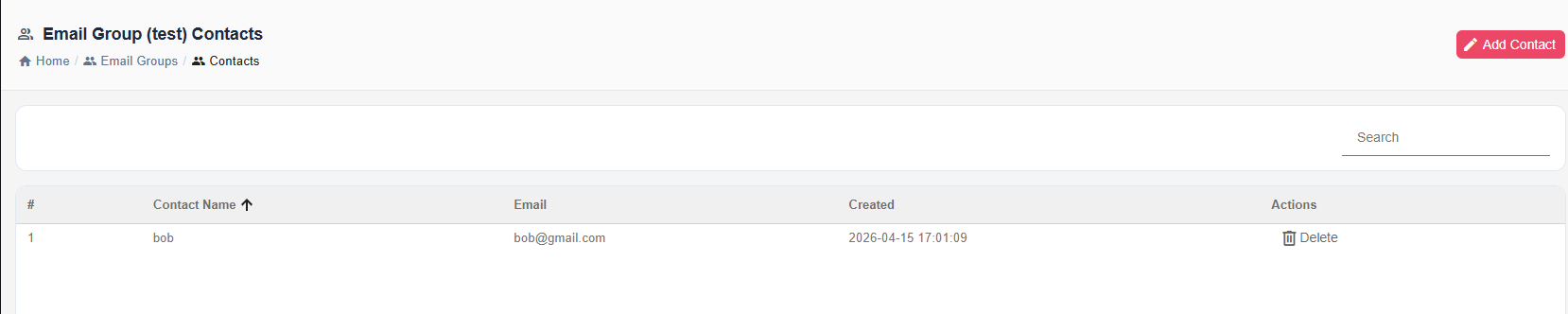
Click Add Contact to add a recipient record:
| Field | Description |
|---|---|
| Contact Name | Display name of the recipient (for example, "Accounting Team"). |
| Email Address | The email address that receives the distribution. |
Multiple contacts can be added to a single group. All contacts in the group receive the report when the group is used as a distribution target.
Usage
Email groups can be referenced in workflow nodes and distribution settings. When a group is used as a distribution target, the current list of contacts in that group at execution time determines the recipients. Updating the group's contacts immediately affects all places that reference it.
Notes
- Contacts in a group must have valid email addresses — invalid addresses cause delivery failures.
- A contact can belong to multiple groups.