DB Push
The DB Push node writes a DataFrame directly to a database table using automatic column mapping from the input DataFrame schema. Unlike DB Table Push, it does not use a visual mapper.
Overview
Use DB Push for straightforward database writes where the DataFrame columns should become the table columns, or where an existing table already matches the DataFrame field names.
Purpose
- Create a destination table from the input DataFrame schema when the table does not exist.
- Insert or update rows using the configured primary key fields.
- Push large DataFrames in batches, with optional staging-table merge behavior.
Configuration
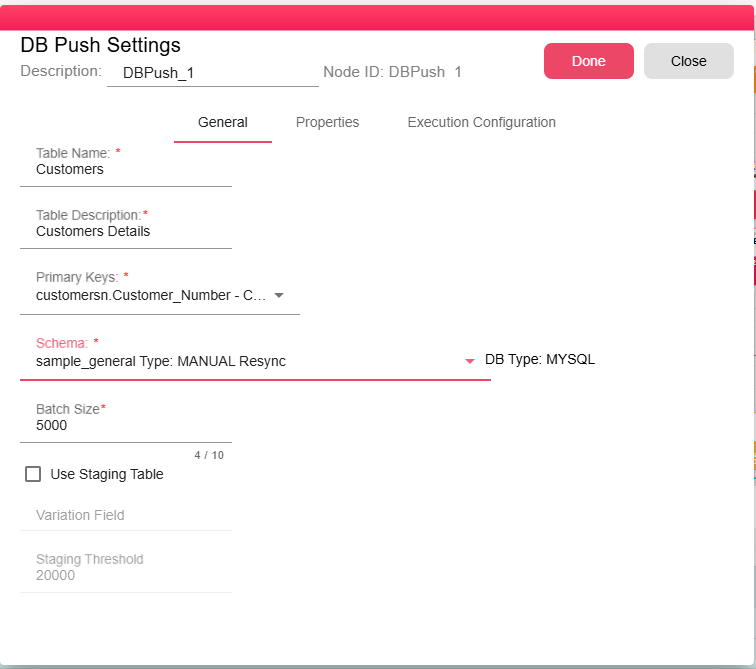
| Field | Required | Description |
|---|---|---|
| Table Name | Yes | Destination table name. Spaces are excluded by the form control. |
| Table Description | Yes | Description/comment applied when a new table is created. |
| Primary Keys | Yes | One or more input columns used as the primary key and upsert key. |
| Schema | Yes | Target database schema connection. |
| Batch Size | Yes | Number of rows submitted per database batch. Default configuration value is 1000. |
| Use Staging Table | No | Enables staging-table merge for larger inputs. |
| Variation Field | Required when staging is enabled | Field used by staging merge logic to resolve duplicates. |
| Threshold | Required when staging is enabled | Row-count threshold that activates staging mode. Default configuration value is 2000. |
Inputs
| Input | Data Type | Input Type | Description |
|---|---|---|---|
| DataFrame | DataFrame | Single | The data to write to the destination database table. |
Outputs
| Output | Data Type | Collection | Description |
|---|---|---|---|
| Output | DataObject | False | Result JSON containing {"result":"success"} after a successful write. |
Properties
| Property | FlowDataType | Description |
|---|---|---|
| TARGET_DB_NAME | String | Target database name |
| TARGET_SCHEMA_NAME | String | Target schema name |
| TARGET_TABLE_NAME | String | Target table name |
Processing Logic
- Loads the selected database schema and opens a database connection.
- Validates that Variation Field is set when Use Staging Table is enabled.
- Checks whether the destination table exists.
- If the table does not exist, creates it from the input DataFrame schema and configured primary keys. Column types are inferred from the input schema and adjusted for the target database dialect.
- Reads DataFrame data from workflow storage and writes it in batches.
- For normal mode, prepares upsert statements using the primary keys.
- For staging mode, creates a staging table when the deduplicated input row count reaches the threshold, writes to staging, merges staging into the destination table, then drops the staging table.
- Aborting the node stops the database update process.
Examples
Create or update an orders table:
- Table Name:
orders - Primary Keys:
order_id - Schema:
ReportingDB\public - Batch Size:
1000
Notes / Limitations
- DataFrame field names drive destination column names. For an existing table, the table columns must match the input schema expected by the node.
- The node may create a new table if the configured table name does not exist; ensure the database user has create-table privileges.
- Staging mode creates a temporary table named after the destination table with a
_nazdaq_stagingsuffix (upper-cased for Oracle), then drops it after merge. - A batch size of
0fails validation at runtime. - For explicit field mapping, static values, scripts, or custom destination schemas, use DB Table Push.