The Copy File (IDM) node uploads an incoming file to Infor Document Management (IDM) through a configured Infor ION service. It creates a new IDM item or updates an existing item as a new revision when a document with the same resource name is found.
Overview
Use this node to archive workflow-generated documents such as invoices, reports, and contracts in IDM. The node selects the IDM document type from the service and maps configured IDM attributes before sending the file content.
Purpose
- Upload a
NodeFile to IDM.
- Select the IDM document type from the Infor ION service.
- Map required and optional IDM attributes using workflow expressions.
- Return the IDM drillback URL and created/updated item metadata.
Configuration
| Field | Description |
|---|
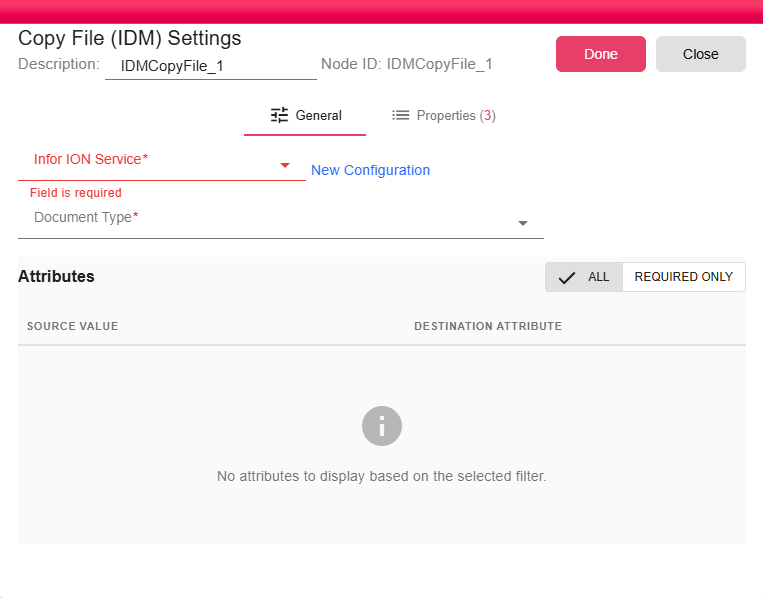
| Infor ION Service | Select an existing Infor ION Service configuration. This service provides the authenticated connection to Infor OS and IDM. |
| Document Type | IDM document type selected. |
| Attributes | Attribute mapper populated from the selected document type. Values support workflow expressions and are evaluated at runtime. |
| Input | Data Type | Input Type | Description |
|---|
| NodeFile | NodeFile | Single | The file to upload to IDM. |
Outputs
| Output | Data Type | Collection | Description |
|---|
| Output | WebUrl | False | A launchable IDM drillback URL. The output title is set to the IDM filename. |
Properties
| Property | FlowDataType | Description |
|---|
| IDM_FILE | JsonNode | The created file attributes |
| IDM_FILE_PID | String | The created file PID |
| IDM_COPY_FILE_CONTENT | String | The file content inside a property |
Processing Logic
- Opens the configured Infor ION service.
- Gets the selected document type ID.
- Uses the input file's computed name as the IDM resource name and upload filename.
- Searches IDM for an existing item with the same document type and
RESOURCENAME.
- Evaluates mapped attribute values in the workflow context.
- If no existing item is found, posts a new IDM item with the base64-encoded file content.
- If an existing item is found, updates that item by PID with checkout/checkin enabled, creating a new revision.
- Emits the IDM response metadata, PID, drillback URL, and filename.
Examples
For an invoice document type, attributes might include:
| Attribute | Example Value |
|---|
InvoiceNumber | ${INVOICE_NUMBER} |
CustomerCode | ${CUSTOMER_CODE} |
DocumentDate | ${INVOICE_DATE} |
Currency | EUR |
Notes / Limitations
- The document type must exist in IDM and the service account must have permission to upload documents of that type.
- Required IDM attributes should be mapped before execution.
- Existing-document detection is based on the selected document type and the input file's computed name/resource name.
- When an existing item is found, the node updates the item instead of creating a second item.
- The file is read and base64-encoded before being sent to IDM.
- The file format is not changed during upload; whatever file is connected as input is uploaded as-is.