If Else Condition
Overview
The If Else Condition node routes an incoming value to one of two downstream paths. It evaluates a scripting expression and forwards the input through either the True or False output port.
Purpose
Use this node when a workflow needs a two-way branch, such as approved/rejected, valid/invalid, or high-priority/normal processing.
The node does not change the input payload. It only decides which output path receives it.
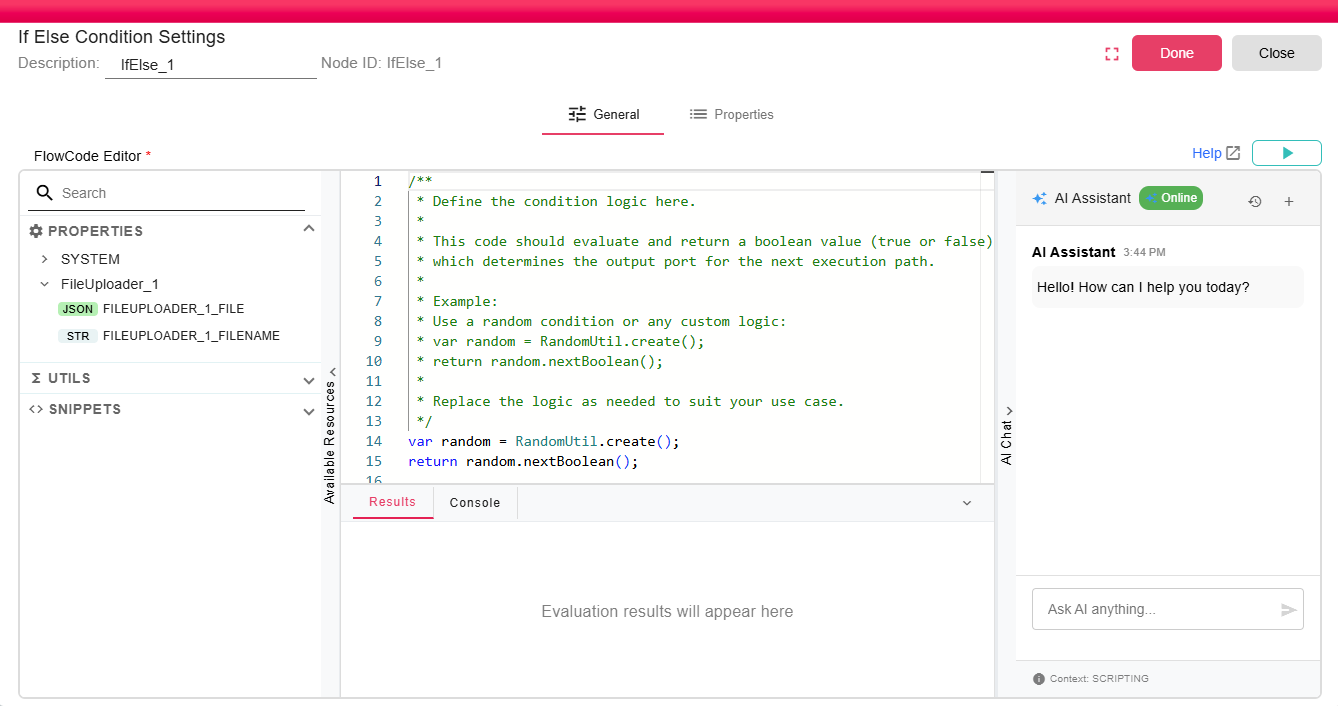
Configuration
| Field | Description |
|---|---|
| Code | Required scripting code. The code must evaluate to a Boolean value: true or false. |
The configuration dialog uses the General Node form with a scripting code editor. The editor supports autocomplete resources, scripting snippets and utilities, and the scripting guide.
Helpful tips for writing the script:
- Use
Ctrl+Spacefor autocomplete. - Use
Node_IDwhen you need to read the node input object. - Use the available scripting utilities for common operations.
For full scripting language documentation, see Scripting Documentation.
Inputs
| Input | Data Type | Input Type | Description |
|---|---|---|---|
| Input | Any | Single | Any Input |
Outputs
| Output | Data Type | Collection | Description |
|---|---|---|---|
| True | Any | False | Receives the original input when the script returns true. |
| False | Any | False | Receives the original input when the script returns false. |
Processing Logic
- The node receives an input on the
Inputport. - The configured code is evaluated as a Boolean scripting expression.
- If the result is
true, the input is sent through theTrueport. - If the result is
false, the input is sent through theFalseport.
If workflow execution is stopped while the script is running, the script evaluation is cancelled.
Examples
Route records based on a property:
return properties.get("ORDER_STATUS") == "APPROVED";
Route based on a data object input:
var input = CustomScript_1.asDataObject();
return input != null;
Route based on a date comparison:
var christmasDay = LocalDate.of(2025, 12, 25);
var today = LocalDate.now();

return today.isBefore(christmasDay);
Notes / Limitations
- The script must return a Boolean value (
trueorfalse). Other result types can cause execution to fail. - The input is passed through unchanged; only the selected output path changes.