Switch Case
Overview
The Switch Case node routes an incoming value to one of three downstream paths. It evaluates a scripting expression and forwards the input through the output that matches the returned number.
Purpose
Use this node when a workflow needs three-way branching, such as low/medium/high priority, approved/pending/rejected, or one of three target systems.
The node does not transform the input payload. It only decides which output path receives it.
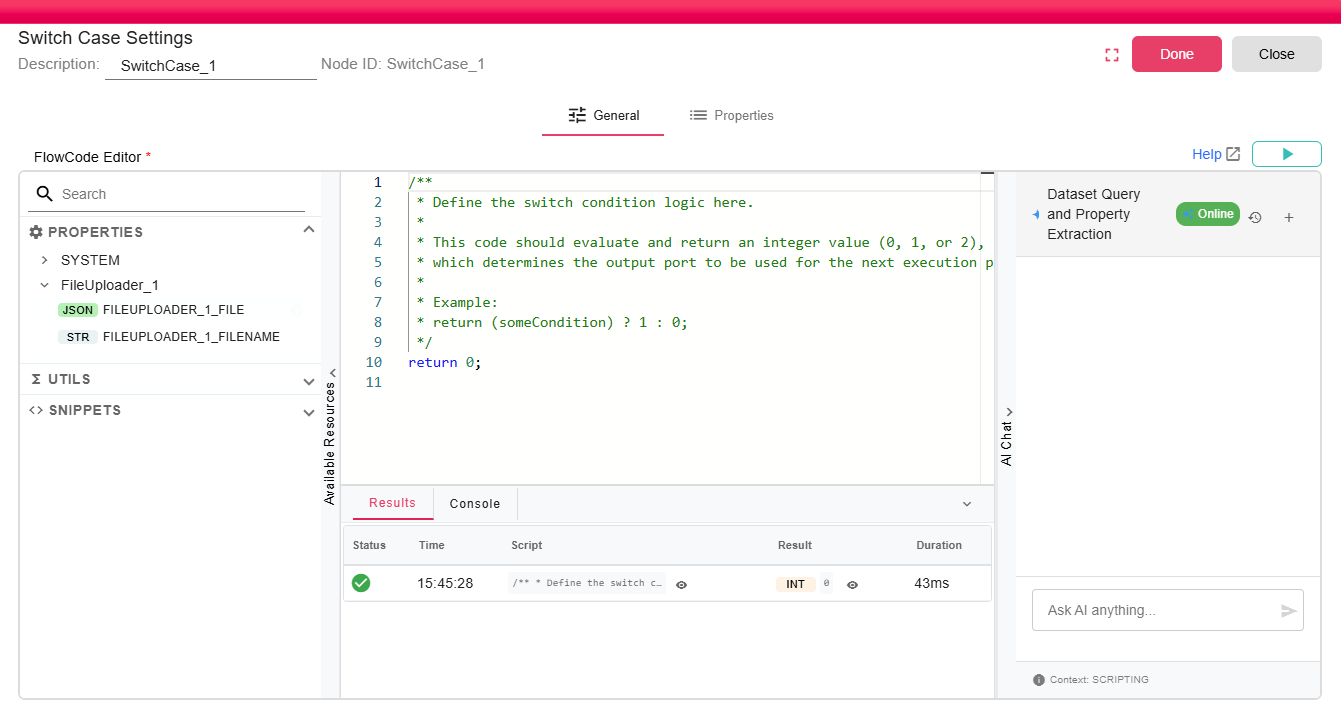
Configuration
| Field | Description |
|---|---|
| Code | Required scripting code. The code must return a numeric value that resolves to 0, 1, or 2. |
The editor supports autocomplete resources, scripting snippets and utilities, and the scripting guide.
Inputs
| Input | Data Type | Input Type | Description |
|---|---|---|---|
| Input | Any | Single | Any Input |
Outputs
| Output | Data Type | Collection | Description |
|---|---|---|---|
| Option0 | Any | False | Output for value 0 |
| Option1 | Any | False | Output for value 1 |
| Option2 | Any | False | Output for value 2 |
Processing Logic
- The node receives an input on the
Inputport. - The configured code is evaluated as a scripting expression.
- Numeric results are converted to an integer when possible.
0,1, and2are routed toOption0,Option1, andOption2.- A result outside
0,1, or2adds a warning and skips the node.
If the script returns null, execution fails with an error. If workflow execution is stopped while the script is running, the script evaluation is cancelled.
Examples
Route based on a status property:
var status = properties.get("ORDER_STATUS");
if (status == "NEW") {
  return 0;
} else if (status == "PENDING") {
  return 1;
} else {
  return 2;
}
Route based on a numeric threshold:
var amount = properties.get("INVOICE_AMOUNT");
if (amount > 10000) {
  return 2; // High value
} else if (amount > 1000) {
  return 1; // Medium value
} else {
  return 0; // Low value
}
For full scripting language documentation, see Scripting Overview.
Notes / Limitations
- The node is marked experimental.
- Only
0,1, and2are valid routing results. - If a selected output is not connected, routing to that option ends that branch.
- For two-way branching, use the If Else Condition node.