Read File (IDM)
Overview
The Read File (IDM) node searches Infor Document Management (IDM), downloads matching document resources, and outputs them as NodeFile values.
Purpose
Use this node when a workflow needs to retrieve files stored in IDM through an Infor ION service.
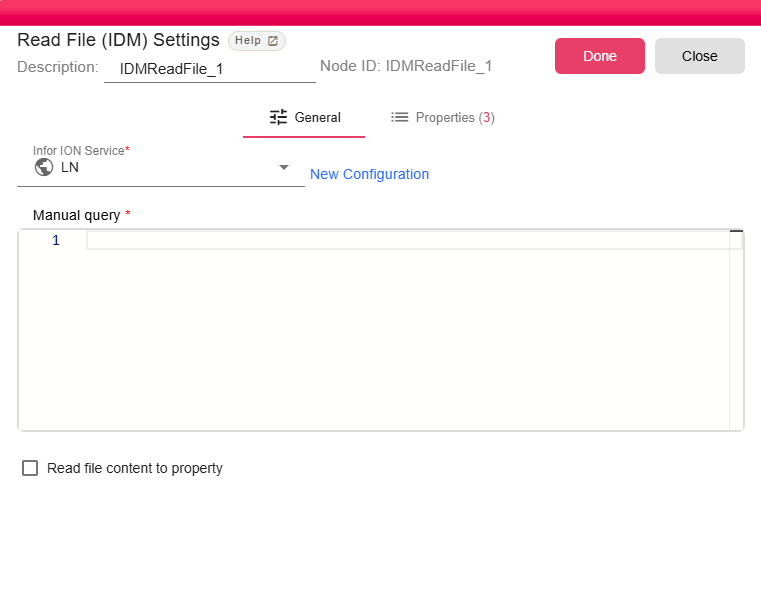
Configuration
| Field | Description |
|---|---|
| Infor ION Service | Infor ION service to connect to. For more, see Infor ION Service. |
| Manual query | IDM query used to find matching items. Workflow properties can be used in the query. |
| Read file content to property | Stores file content in IDM_FILE_CONTENT when enabled. The UI disables this option for unsupported file extensions. |
Outputs
| Output | Data Type | Collection | Description |
|---|---|---|---|
| OutputFile | NodeFile | True | The node also exposes: |
Properties
| Property | FlowDataType | Description |
|---|---|---|
| IDM_FILE | JsonNode | File information that been read |
| IDM_ITEM | JsonNode | The IDM item information |
| IDM_FILE_CONTENT | String | The file content inside a property |
Processing Logic
At runtime, the node evaluates expressions in the manual query and asks IDM for up to 1000 matching items. For each item, it downloads the main resource, attaches IDM item and file metadata properties, loads the downloaded file as a NodeFile, and emits it. If no items are found, the node emits an empty output.
Examples
Use an IDM query that identifies the document type, attributes, or PID required by your workflow. Dynamic workflow values can be embedded in the query when the query needs to vary per iteration.
Notes / Limitations
- The Infor ION service must have permission to search IDM and download resources.
- The node can emit multiple files when the query returns multiple IDM items.
- If no IDM items match the query, the node returns an empty output rather than failing.