File Uploader
Overview
The File Uploader node lets the workflow developer upload and store a file as part of the node configuration. When the workflow runs, the node emits that embedded file as a NodeFile to downstream nodes.
Purpose
Use this node when the workflow should always run with a file that was selected during workflow design, such as a fixed CSV input, an Excel template, or a document template. The workflow user is not asked to upload a file at runtime.
Configuration
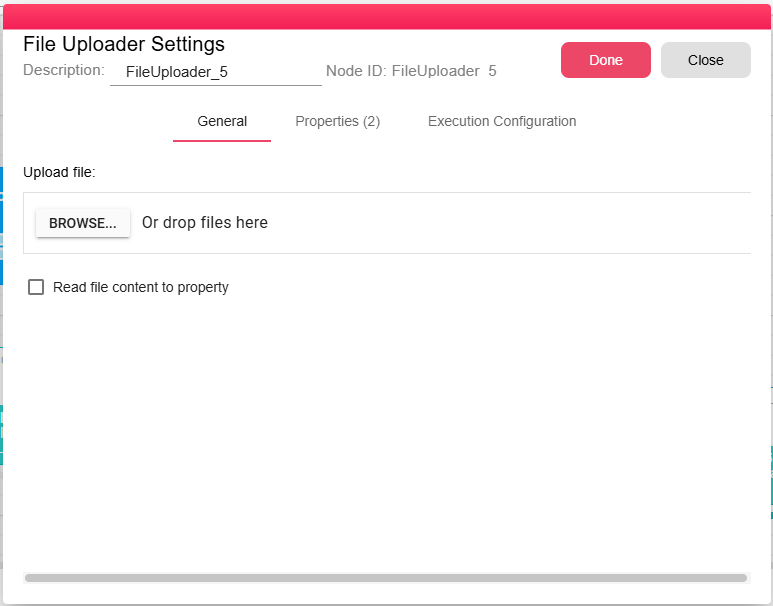
| Field | Description |
|---|---|
| Upload file | Required. File selected by the developer while configuring the node. The file is stored with the workflow configuration and used whenever the workflow runs. |
| Read file content to property | Stores the raw contents of the uploaded file in FILE_UPLOADER_CONTENT when enabled. The UI disables this option for unsupported file extensions such as Excel and PDF files. |
Outputs
| Output | Data Type | Collection | Description |
|---|---|---|---|
| OutputFile | NodeFile | False | The uploaded file, available as input to downstream nodes. |
Properties
| Property | FlowDataType | Description |
|---|---|---|
| FILE_UPLOADER_FILE | JsonNode | JSON object with details about the uploaded file, including fileName, name, ext, mimeType, relativePath, bytes, lastModified, and renamed. |
| FILE_UPLOADER_CONTENT | String | Raw content of the uploaded file, only when Read file content to property is enabled. |
Processing Logic
When a workflow containing a File Uploader runs:
- The node reads the file stored in its configuration.
- The processor loads the stored file into a NodeFile.
- The node emits the NodeFile through its output port.
If Read file content to property is enabled, the file content is included in the output properties. The runtime user does not select or upload a file.
Examples
- Embed a static CSV file that should be processed every time the workflow runs.
- Provide an Excel or document template to downstream transformation nodes.
Notes / Limitations
- The configured file is selected by the workflow developer.
- Workflow users are not prompted to upload a file when running the workflow.
- The file is loaded into the iteration's execution storage when the node runs and is cleaned up according to the workflow's cleanup settings.
- For reading files from a server path (rather than from a user upload), use the Read File (B2WS Server) node instead.