Import Table (Parquet)
Overview
The Import Table (Parquet) node reads Apache Parquet data from an upstream file and converts it into a DataFrame.
Purpose
Use this node when a workflow receives columnar data from data pipelines, warehouses, Spark jobs, Hadoop exports, or other systems that produce Parquet files.
Configuration
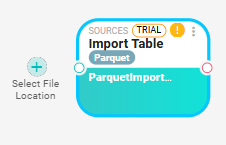
This node requires a file input and has no additional configuration fields. When you drag it onto the canvas:
- Click the + icon on the node to add an input source.
- Select a source node from the list (for example, a Read File or File Listener node that provides a
.parquetfile). - Configure the source node to point to the Parquet file you want to read.
- Open the Parquet node settings to preview the output.
Inputs
| Input | Data Type | Input Type | Description |
|---|---|---|---|
| InputFile | NodeFile | Single | Input Parquet file that been read |
Outputs
| Output | Data Type | Collection | Description |
|---|---|---|---|
| ParquetDataSource | DataFrame | False | DataFrame created from the Parquet schema and rows. |
Processing Logic
The node reads the upstream file with DuckDB. If the input is an archive file, it extracts the archive into the working directory and reads all extracted *.parquet files from the extracted folder. It builds the output schema from a sample result set and writes the full Parquet query result into the output DataFrame. If no rows are found, the node adds a warning.
Examples
- Each column corresponds to a field defined in the Parquet schema
- Data types are preserved as defined in the Parquet file (integers, doubles, strings, timestamps, etc.)
- All rows from the file are included by default
Notes / Limitations
- No additional configuration is required on this node.
- When reading an archive, the node reads Parquet files from the first extracted folder.
- For large Parquet files, use Query In-Memory downstream to filter or aggregate the data before passing it further in the workflow.