Query
Overview
The Query node runs a SQL statement against a configured database schema and outputs the result as a DataFrame.
Purpose
Use this node when a workflow needs structured data from a relational database and the SQL should be written directly rather than built visually. It is commonly used as the starting point for reporting, exports, and transformations that operate on database records.
Configuration
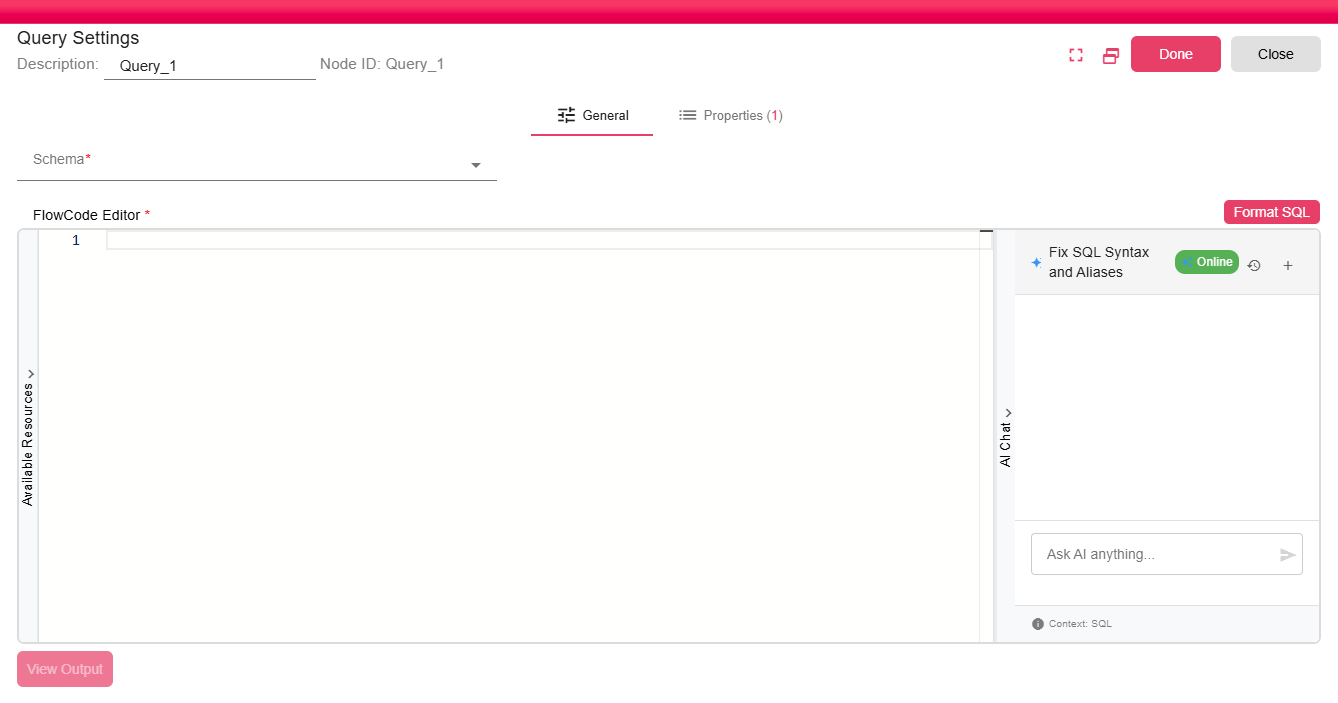
| Field | Description |
|---|---|
| Schema | Select the database schema to query. The schema is loaded from configured database connections. |
| SQL Query | Enter the SQL statement in the code editor. The editor supports SQL formatting and preview. |
The embedded SQL editor provides:
- Syntax highlighting for SQL keywords, functions, and string literals.
- Format SQL to reformat the statement.
- Available resources and properties for dynamic expressions.
- AI Chat assistance when AI/LLM settings are configured.
- View Output to preview the result DataFrame before saving.
Outputs
| Output | Data Type | Collection | Description |
|---|---|---|---|
| QuerySelectData | DataFrame | False | Rows and columns returned by the SQL statement. |
Properties
| Property | FlowDataType | Description |
|---|---|---|
| SQL_SELECT_STATEMENT | String | The query that been executed |
Processing Logic
At runtime, B2Win Suite evaluates expressions inside the configured SQL, trims a trailing semicolon if one is present, executes the query against the selected schema, builds the output DataFrame schema from the result set, and writes the result rows to the workflow storage. If the result set is empty, the node emits a warning that no data was found within the selection.
Examples
You can embed workflow property values directly in the SQL query:
SELECT * FROM orders
WHERE created_date >= '${START_DATE}'
  AND customer_id = ${CUSTOMER_ID}
At runtime, B2Win Suite evaluates the expressions and substitutes the current property values before executing the query.
Notes / Limitations
- The query is executed each time the iteration runs. For large result sets, consider adding
WHEREfilters to limit the data returned. - For polling new records over time, use the Query Trigger instead, which tracks progress across iterations.
- For in-memory ad hoc queries on DataFrames already in the workflow, use the Query In-Memory transformation node.