Read File (B2WS Server)
Overview
The Read File (B2WS Server) node reads one or more files from the B2Win Suite server file system and outputs them as NodeFile values.
Purpose
Use this node when the files your workflow needs are stored on the same machine where the B2Win Suite server process runs.
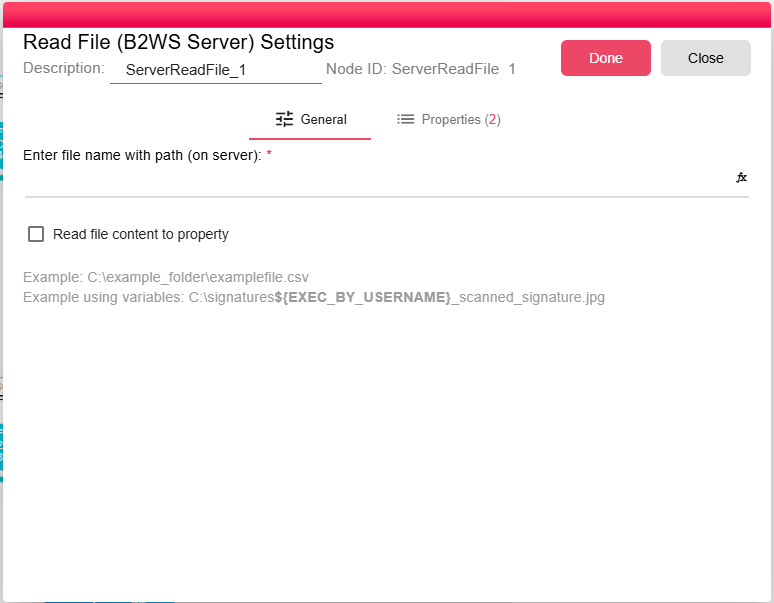
Configuration
| Field | Description |
|---|---|
| File Path | Exact server file path or wildcard pattern. You can use workflow properties in the path to make it dynamic. |
| Read file content to property | Stores the raw file contents in FILE_READER_CONTENT when enabled. The UI disables this option for unsupported file extensions. |
Outputs
| Output | Data Type | Collection | Description |
|---|---|---|---|
| OutputFile | NodeFile | True | The node also exposes: |
Properties
| Property | FlowDataType | Description |
|---|---|---|
| FILE_READER_FILE | JsonNode | File information that been read |
| FILE_READER_CONTENT | String | The file content inside a property |
Processing Logic
At runtime, the node evaluates expressions in the path. If the path contains *, it lists matching files in the parent directory and outputs them sorted by file name. If the path is exact, it outputs the file only when it exists and is a regular file. If the path is blank or no files match, the node emits an empty output.
Examples
The file path supports ${propertyName} expressions. For example:
/data/exports/${EXEC_BY_USERNAME}/${REPORT_DATE}/data.csv
At runtime, EXEC_BY_USERNAME and REPORT_DATE are replaced with their current values, allowing the same workflow to read different files per user or per date.
Wildcard examples:
C:\example_folder\invoice_*.csv
Notes / Limitations
- The path must be accessible by the B2Win Suite server process. Ensure the server has read permissions for the specified directory.
- Wildcards are matched within the parent directory of the configured path.
- If no files match, the node returns an empty output rather than failing.
- For reading files from network shares, FTP, SFTP, SharePoint, or IDM, use the corresponding Read File node variant for that storage type.