Read File (Win Share)
Overview
The Read File (Win Share) node reads one or more files from a Windows shared location and outputs them as NodeFile values.
Purpose
Use this node when a workflow needs files from an SMB/Windows share configured as a Windows Share service.
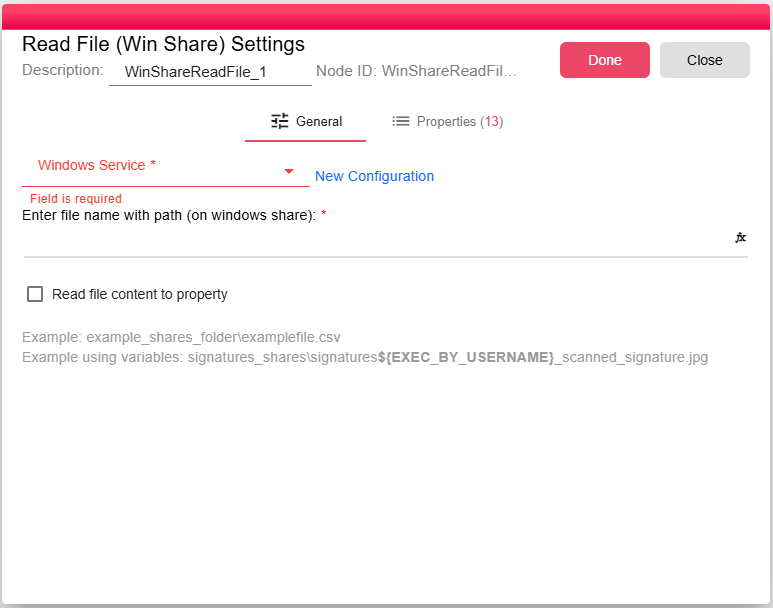
Configuration
| Field | Description |
|---|---|
| Windows Share Service | Windows share service to connect to. For more, see Windows Share Service. |
| File Path | File path on the Windows share. The value can be an exact path or a wildcard pattern and can use workflow properties. |
| Read file content to property | Stores the file content in WIN_SHARE_FILE_READ_CONTENT when enabled. The UI disables this option for unsupported file extensions such as Excel and PDF files. |
Outputs
| Output | Data Type | Collection | Description |
|---|---|---|---|
| OutputFile | NodeFile | True | One output item for each matching shared file. |
Properties
| Property | FlowDataType | Description |
|---|---|---|
| WIN_SHARE_FILE_READ_FILE | JsonNode | |
| WIN_SHARE_FILE_READ_CONTENT | String | |
| WIN_SHARE_FILE_READ_NAME | String | |
| WIN_SHARE_FILE_READ_PATH | String | |
| WIN_SHARE_FILE_READ_SIZE | Long | |
| WIN_SHARE_FILE_READ_LAST_MODIFIED | Long | |
| WIN_SHARE_FILE_READ_IS_HIDDEN | Boolean | |
| WIN_SHARE_FILE_READ_CAN_READ | Boolean | |
| WIN_SHARE_FILE_READ_CAN_WRITE | Boolean | |
| WIN_SHARE_FILE_READ_OWNER_GROUP | String | |
| WIN_SHARE_FILE_READ_OWNER | String | |
| WIN_SHARE_FILE_READ_REQUEST_PROPERTIES | JsonNode | |
| WIN_SHARE_FILE_READ_SERVER | String |
Processing Logic
At runtime, the node evaluates expressions in the configured path, splits the parent directory from the file pattern, lists matching SMB files, skips directories, downloads each file into the workflow working directory, attaches SMB metadata properties, and emits each downloaded file as a NodeFile. If no matching files are found, the node emits an empty output.
Examples
example_shares_folder\examplefile.csv
signatures_shares\signatures${EXEC_BY_USERNAME}_scanned_signature.jpg
Notes / Limitations
- The configured Windows Share service must have permission to list and read the target path.
- The file path may point to a single file or a wildcard pattern.
- Directories are ignored.
- If no files match, the node returns an empty output rather than failing.