Custom Script
Overview
The Custom Script node allows you to write custom logic to process data or files within your workflow.
Purpose
Use Custom Script when a transformation cannot be expressed with standard nodes. The script can pass the input through, create a new file, return a new table, or return a data object depending on the input type and script result.
Configuration
| Setting | Description |
|---|---|
| Code | A scripting editor field. The script is required and can be previewed from the dialog. |
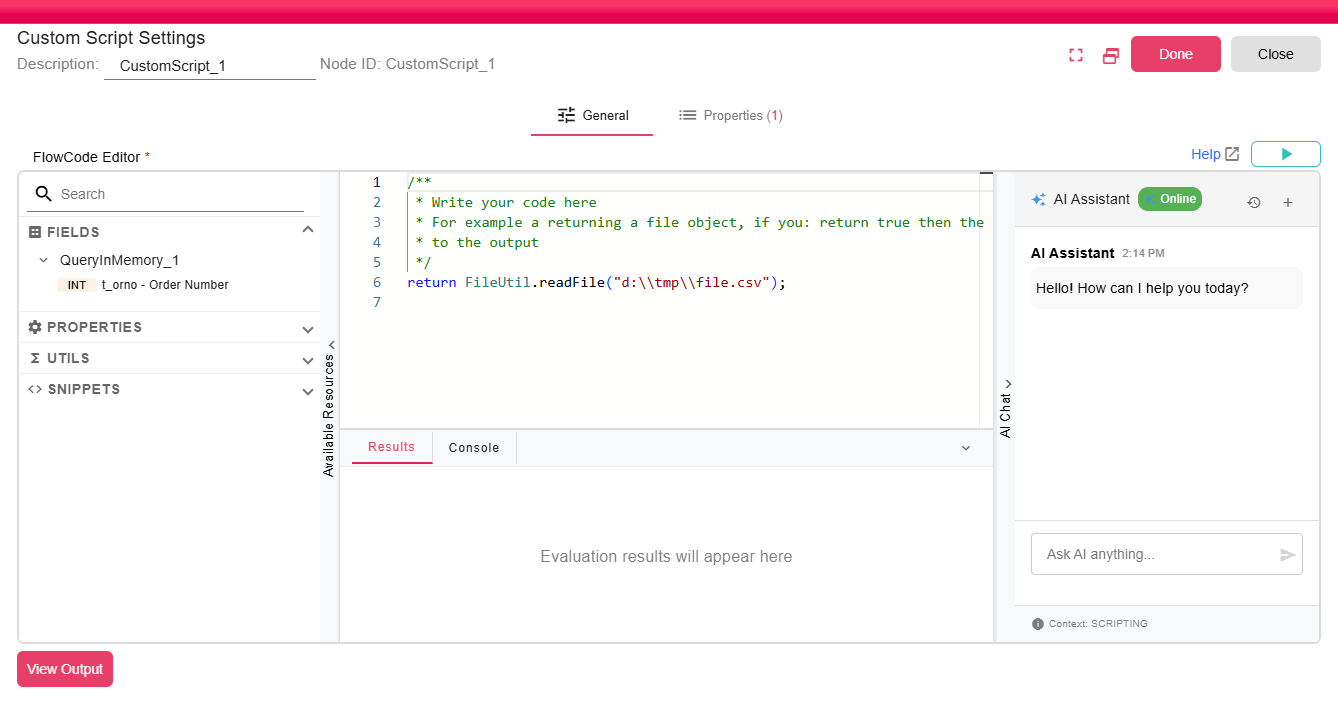
The node includes a built-in FlowCode Editor with the following features:
- Syntax Highlighting - Language-aware coloring for better readability.
- Available Resources - A collapsible panel listing properties, context variables, and available utilities to use.
- AI Chat - An integrated assistant that can help write, explain, or debug your scripts.
Inputs
| Input | Data Type | Input Type | Description |
|---|---|---|---|
| Input | Any | Single | Any supported workflow input type, including NodeFile, DataFrame, and DataObject. |
Outputs
| Output | Data Type | Collection | Description |
|---|---|---|---|
| True | Any | False | Any supported workflow output type. The emitted type depends on the input type and returned script value. |
Properties
| Property | FlowDataType | Description |
|---|---|---|
| CUSTOM_SCRIPT_FILE | JsonNode | The processor defines the CUSTOM_SCRIPT_FILE runtime property for file metadata when a file is produced. |
Processing Logic
The node evaluates the configured script. The returned value controls the output:
true: passes the original input through unchanged.false: skips emitting output and records an informational message.- File input: the script must return a
Fileto emit a new NodeFile. - DataFrame input: the script must return a
SuiteTableto emit a new DataFrame. - DataObject input: the script must return a
JsonNodeto emit a new DataObject.
If the returned value does not match the expected type for the input, the node fails with a no-output error.
Examples
Example 1: Filter a DataFrame (Table Input)
Filter input data by the product_line column, returning only rows that end with "Cars":
var table = NodeInputReader.inputAsDataFrame();
var stringColumn = table.stringColumn("product_line");
var filteredTable = table.where(stringColumn.endsWith("Cars"));
return filteredTable;
Example 2: Compress Files into a ZIP Archive (File Input)
The following script collects an IDM file and a downloaded licence PDF, then returns a ZIP archive containing both:
// Read the file listening to.
var idmFile = IDMFileListener_1.asFile();

// Create a temp file path
var tmpPath = FileUtil.createTempFilePath("Alpha", ".pdf");
// Fetch file using an API call
var licencePdf = HttpUtil.download(LICENCE_AGREEMENT, tmpPath).getBody();

// Add files to list
var fileToCompress = ArrayUtils.empty(File);
fileToCompress.add(idmFile);
fileToCompress.add(licencePdf);
fileToCompress.size();

// Output the file
var tmpOutputPath = FileUtil.createTempFilePath("Archive", ".zip");
return CompressionUtil.compressZipFiles(fileToCompress, tmpOutputPath);
Notes / Limitations
- Use
Ctrl+Spaceto trigger autocomplete. Typingutilsurfaces all available utility groups; selecting one and appending.lists its supported methods. - Node input is accessed through the NodeInputReader utility.
- For a full reference of all available utilities and their methods, see the Utilities section of the Scripting documentation.
- For a complete reference of the scripting language, types, and utilities, see the Scripting Documentation.