Data Joiner
Overview
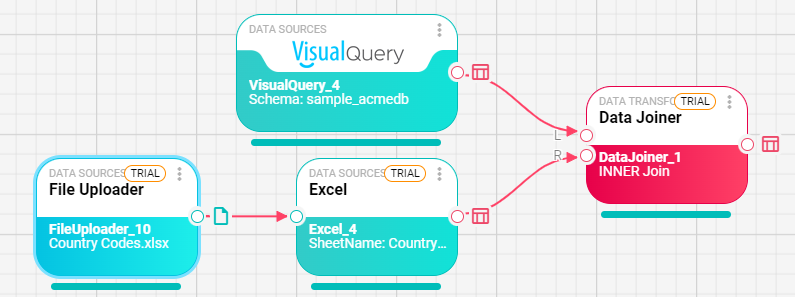
The Data Joiner node combines two DataFrame inputs into one DataFrame by joining rows from a left input and a right input.
Purpose
Use Data Joiner when two upstream nodes produce related tables and you need one combined table for later transformations, exports, reports, or destinations. For example, you can join a database query result with rows imported from an Excel file.
Configuration
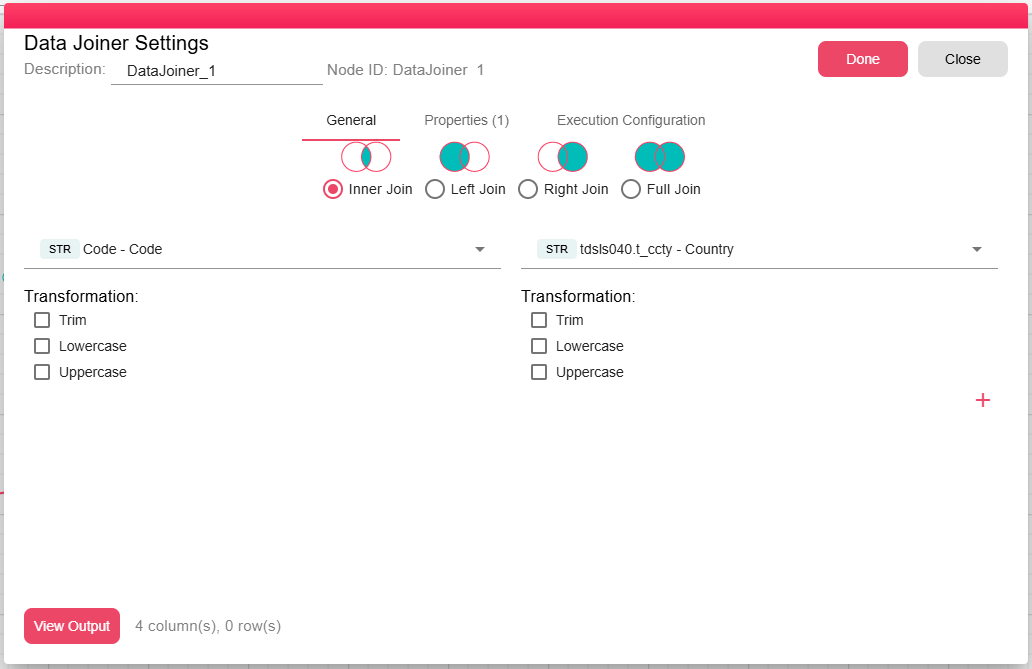
Configure the join in the node dialog:
| Setting | Description |
|---|---|
| Left Input / Right Input | The two DataFrame ports to join. |
| Join Columns | One or more pairs of columns used to match rows between the left and right inputs. |
| Column Function | Optional normalization applied before matching: None, Trim, Upper Case, or Lower Case. |
| Link Type | The join type: Inner Join, Full Outer Join, Left Outer Join, or Right Outer Join. |
Inputs
| Input | Data Type | Input Type | Description |
|---|---|---|---|
| LeftDataFrame | DataFrame | Single | A DataFrame connected to the LeftDataFrame port. |
| RightDataFrame | DataFrame | Single | A DataFrame connected to the RightDataFrame port. |
Outputs
| Output | Data Type | Collection | Description |
|---|---|---|---|
| OutputDataFrame | DataFrame | False | A DataFrame containing the joined rows and selected columns. |
Properties
| Property | FlowDataType | Description |
|---|---|---|
| DATA_JOINER_SQL_STATEMENT | String | The query that been executed |
Processing Logic
At runtime, the node reads both inputs from their parquet-backed DataFrame storage, builds a DuckDB query for the configured join, creates the output schema from the query result, and writes the joined result into a new DataFrame.
If no rows match the selection, the node emits a warning while still producing the output DataFrame structure.
Examples
Join an orders DataFrame to a customers DataFrame:
- Left column:
customer_id - Right column:
id - Link Type:
LEFT_OUTER - Result: all order rows are kept, with matching customer columns added when available.
Notes / Limitations
- Both inputs must be DataFrames.
- Join column values must be compatible after any selected Trim, Upper Case, or Lower Case function is applied.
- For more complex SQL, use Query In-Memory.