Query In-Memory
Overview
The Query In-Memory node lets you write a SQL query against one or more DataFrames that are already in the workflow. Connect any number of DataFrame-producing nodes to it and reference their outputs as SQL tables without needing a database connection.
This is powered by an embedded in-memory SQL engine (DuckDB), so you get full SQL capabilities: JOIN, GROUP BY, WHERE, UNION, window functions, and more.
Purpose
Use Query In-Memory when the needed transformation is easier to express in SQL than with individual nodes. It is useful for joins, filters, aggregates, unions, calculated columns, and window functions over data already produced by the workflow.
Configuration
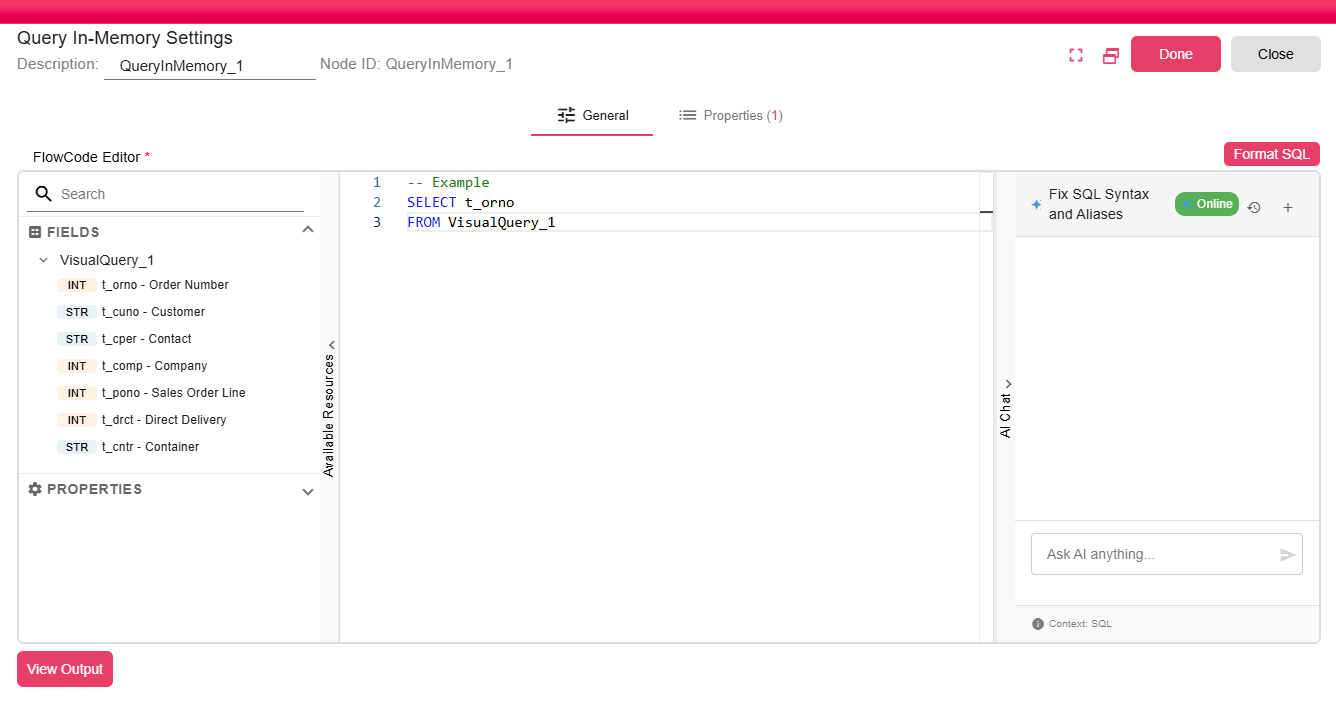
| Field | Description |
|---|---|
| SQL Query | A SELECT statement using the connected DataFrames as tables. Supports full SQL syntax including joins, aggregations, subqueries, and window functions. |
The SQL query field supports expression evaluation before execution, so workflow properties can be used to generate dynamic SQL when needed.
Inputs
| Input | Data Type | Input Type | Description |
|---|---|---|---|
| InputDataFrame | DataFrame | Multiple | One or more DataFrames connected to the node. |
Outputs
| Output | Data Type | Collection | Description |
|---|---|---|---|
| QuerySelectData | DataFrame | False | A DataFrame containing the rows and columns returned by the SQL query. |
Properties
| Property | FlowDataType | Description |
|---|---|---|
| SQL_IN_MEMORY_STATEMENT | String | The query that been executed |
Processing Logic
- Connect one or more nodes whose output is a DataFrame.
- Each connected DataFrame is registered as a temporary DuckDB view. The view name matches the source node ID used by the workflow.
- The configured SQL query is evaluated and executed against those temporary views.
- The result schema is inferred from the query result.
- The result is written to a new DataFrame output.
FlowCode Editor Features
- Syntax Highlighting - SQL keywords, functions, and strings are color-coded.
- Format SQL - Reformats the query with correct indentation.
- Available Resources - Lists all connected DataFrames with their column names and types, making it easy to write accurate queries.
- AI Chat - An integrated AI assistant that can help write, explain, or debug your SQL queries.
- View Output - Previews the resulting DataFrame against the current execution state.
Example
Suppose you have two nodes:
Query_1 (orders)- columns:order_id,customer_id,amount,statusQuery_2 (customers)- columns:customer_id,name,region
You can join them with:
SELECT
  o.order_id,
  c.name        AS customer_name,
  c.region,
  o.amount,
  o.status
FROM Query_1 o
JOIN Query_2 c ON o.customer_id = c.customer_id
WHERE o.status = 'OPEN'
ORDER BY o.amount DESC
Notes / Limitations
- The in-memory SQL engine processes all data in memory on the server. For very large DataFrames, ensure sufficient server memory.
- Temporary view names are based on the connected source node IDs. Match the exact name shown in the Available Resources panel.
- The query cannot be empty.
- Unlike the Query node, Query In-Memory does not connect to an external database. It only queries data already in the workflow.