Rename Column
Overview
The Rename Column node maps incoming DataFrame columns to new Column Code and Column Description values. Use it to standardize column codes before downstream nodes, exports, or database writes, and to assign or update human-readable descriptions without changing the underlying data.
Purpose
Use Rename Column when the DataFrame schema needs clearer names, names compatible with a target table/API, or descriptions suitable for reporting.
Configuration
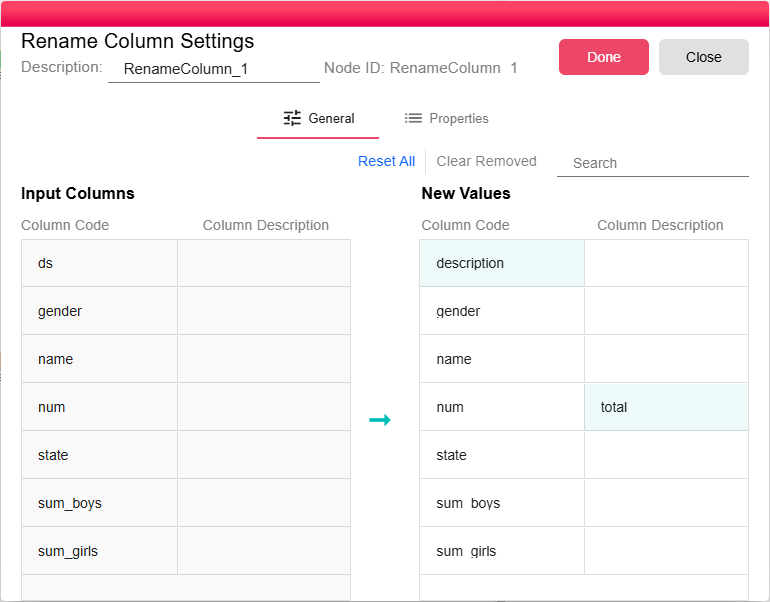
The dialog shows two side-by-side tables: Input Columns on the left and New Values on the right. For each input column, you can set:
| Field | Description |
|---|---|
| Column Code | The new system name for the column. Leave unchanged to keep the original code. |
| Column Description | The new description for the column. Leave empty to keep the original description. |
You can change the column code only, the description only, or both. For example, rename ds to description, or keep num as the code and set its description to total.
Columns not modified in New Values are passed through unchanged. Use Reset All, Clear Removed, or Search to manage the mapping list.
Inputs
| Input | Data Type | Input Type | Description |
|---|---|---|---|
| InputData | DataFrame | Single | A DataFrame connected to the InputData port. |
Outputs
| Output | Data Type | Collection | Description |
|---|---|---|---|
| OutputData | DataFrame | False | A DataFrame emitted from the OutputData port with the mapped column codes and descriptions applied. |
Processing Logic
The node builds a new schema from the configured mappings, then reads the input parquet data with column aliases for renamed fields. It preserves row values and emits a warning when a configured column is not found in the input data.
Examples
- Normalizing column codes from different source systems before joining them
- Assigning human-readable descriptions to database column codes before exporting to Excel
- Renaming column codes to match a downstream API or table schema while preserving descriptive labels
Notes / Limitations
- Column codes are case-sensitive. Ensure the input column code exactly matches what is in the DataFrame.
- If you need to both rename and reorder columns, combine this node with Order By or Query In-Memory.