Rename File
Overview
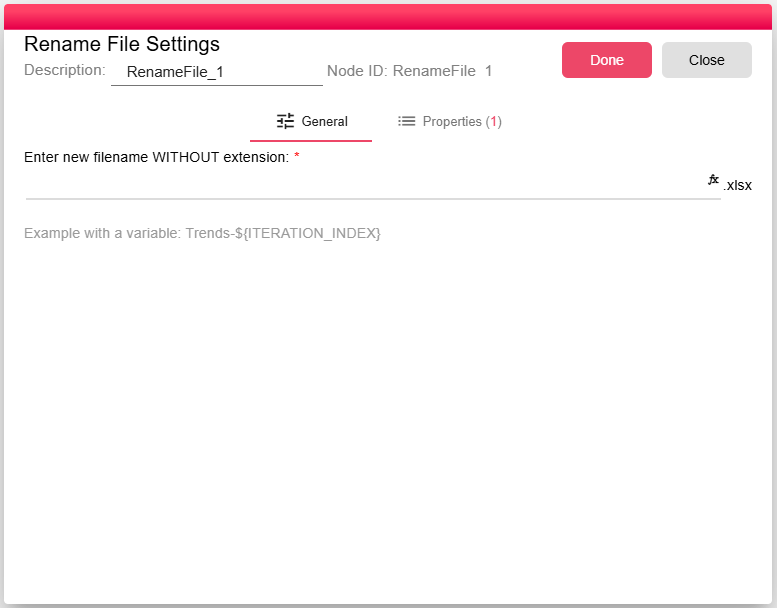
The Rename File node changes the computed name of an incoming file while passing the file content through unchanged.
Purpose
Use Rename File when a downstream destination, email attachment, archive, or external system needs a specific filename generated from static text or workflow properties.
Configuration
| Setting | Description |
|---|---|
| New filename | The new file name without the extension. This field can be static or can include workflow properties, such as Trends-${ITERATION_INDEX}. |
Inputs
| Input | Data Type | Input Type | Description |
|---|---|---|---|
| InputFile | NodeFile | Single | A NodeFile connected to the InputFile port. |
Outputs
| Output | Data Type | Collection | Description |
|---|---|---|---|
| OutputFile | NodeFile | False | A NodeFile connected to the OutputFile port. The physical file content is copied from the input, but the output file name is updated. |
Properties
| Property | FlowDataType | Description |
|---|---|---|
| FILE_RENAMER_FILE | JsonNode | The processor defines the FILE_RENAMER_FILE runtime property for generated file metadata. |
Processing Logic
The node evaluates the configured filename expression, validates that it can be used as a filesystem path, loads the incoming file into a new output NodeFile, and renames that output using the configured name.
Examples
Use invoice-${CUSTOMER_ID}-${ITERATION_INDEX} as the new filename to produce unique attachment names per workflow iteration.
Notes / Limitations
- Enter the base filename without the extension.
- Invalid filesystem path characters cause the node to fail.
- The node does not change the file contents.