HTTP File-In
Overview
The HTTP File-In trigger starts a workflow iteration when an external client uploads one or more files with an HTTP multipart/form-data POST request.
Purpose
Use this trigger when an external system, script, webhook, or web application needs to send files directly into a B2Win Suite workflow.
Configuration
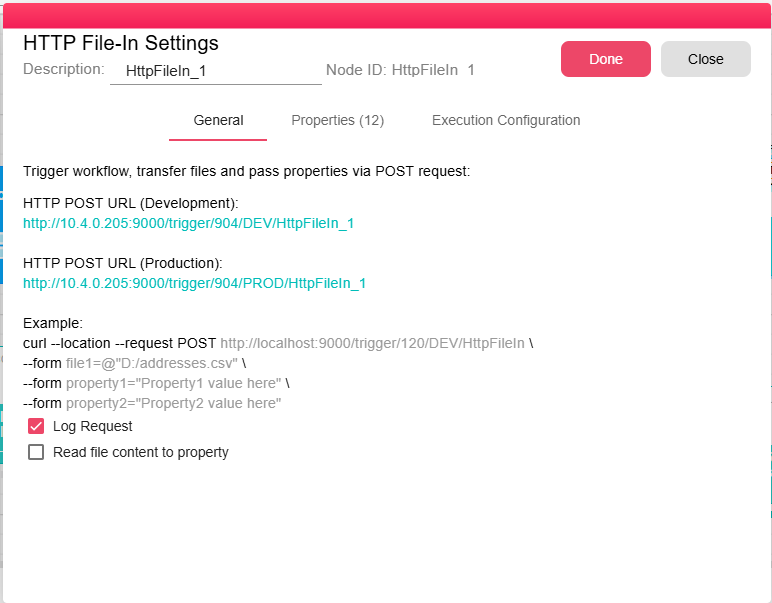
| Field | Description |
|---|---|
| Log Request | Captures standard HTTP request metadata and form/query values as properties. |
| Read file content to property | When checked, the uploaded file content is loaded into HTTP_FILE_IN_CONTENT where supported by the file type. |
Outputs
| Output | Data Type | Collection | Description |
|---|---|---|---|
| OutputFile | NodeFile | False | The trigger outputs a NodeFile for each uploaded file. If multiple files are sent in one request, they are processed sequentially. |
Properties
| Property | FlowDataType | Description |
|---|---|---|
| REQUEST_CONTENT_TYPE | String | Request content type. |
| REQUEST_HEADERS | JsonNode | Request headers as JSON. |
| REQUEST_QUERY_STRING | JsonNode | Query string values as JSON. |
| REQUEST_SECURED | Boolean | |
| REQUEST_VERSION | String | |
| REQUEST_REMOTE_ADDRESS | String | |
| REQUEST_METHOD | String | HTTP method used for the request. |
| REQUEST_PATH | String | |
| REQUEST_HOST | String | |
| REQUEST_BODY | String | |
| HTTP_FILE_IN_FILE | JsonNode | Uploaded file metadata. |
| HTTP_FILE_IN_CONTENT | JsonNode | File content when Read file content to property is enabled. |
Processing Logic
The trigger expects multipart/form-data. It reads uploaded file parts, copies each file to the trigger working directory, rejects restricted file extensions, loads the file into a NodeFile, and emits an iteration for each file.
Restricted extensions are exe, class, java, dll, bat, and sh.
Examples
Trigger URL Format
The node dialog shows the generated URL. The backend trigger endpoint uses this format:
http://<ServerAddress>:<Port>/trigger/<WorkflowID>/<Environment>/<TriggerID>
<ServerAddress>: Your B2Win Suite server hostname.<Port>: The server HTTP port.<WorkflowID>: The workflow id.<Environment>:DEVfor development orPRODfor production.<TriggerID>: The HTTP File-In node id.
Sending a File
Use an HTTP POST request with multipart/form-data encoding to send a file to the generated URL:
curl -X POST \
  "http://your-server:9000/trigger/<WorkflowID>/PROD/<TriggerID>" \
  -F "file=@/path/to/your/file.pdf"
You can also pass additional data as query parameters or form fields:
curl -X POST \
  "http://your-server:9000/trigger/<WorkflowID>/PROD/<TriggerID>?invoiceId=12345&company=Acme" \
  -F "file=@invoice.pdf"
This creates properties invoiceId = "12345" and company = "Acme" on the resulting iteration, which downstream nodes can read using ${invoiceId} and ${company}.
Notes / Limitations
- The request must be
multipart/form-data. - At least one file part is required.
- Each uploaded file creates its own emitted output.
- Use HTTP Trigger for requests that do not upload files.