HTTP Trigger
Overview
The HTTP Trigger starts a workflow iteration when an external client calls the trigger URL. It is a reactive trigger and does not poll.
Purpose
Use this trigger to integrate B2Win Suite with external applications, scripts, schedulers, API calls, or webhooks that need to start a workflow.
Configuration
After adding the HTTP Trigger node to the canvas, activate it by enabling the trigger toggle inside the node settings.
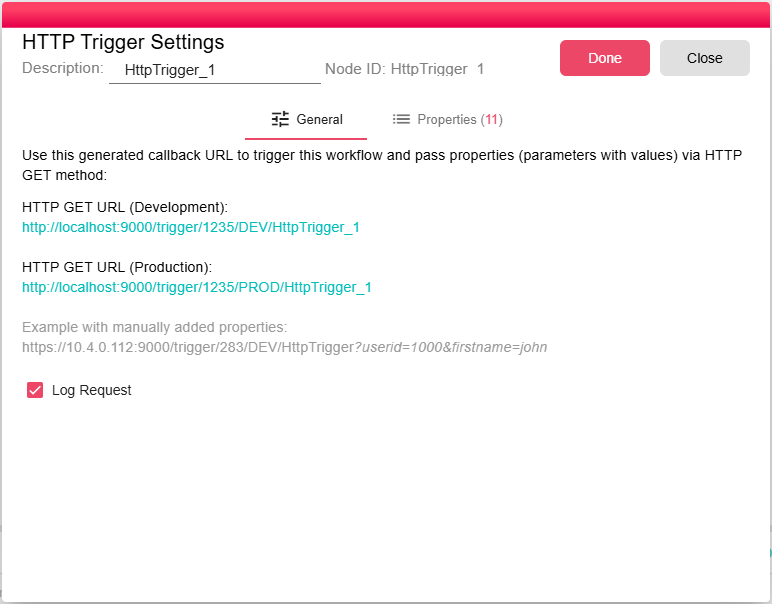
| Field | Description |
|---|---|
| Log Request | When enabled, POST request body data is captured in request properties where supported. |
Properties
| Property | FlowDataType | Description |
|---|---|---|
| REQUEST_CONTENT_TYPE | String | Request content type. |
| REQUEST_HEADERS | JsonNode | Request headers as JSON. |
| REQUEST_QUERY_STRING | JsonNode | Query string values as JSON. |
| REQUEST_SECURED | Boolean | |
| REQUEST_VERSION | String | |
| REQUEST_REMOTE_ADDRESS | String | Remote client address. |
| REQUEST_METHOD | String | HTTP method used for the request. |
| REQUEST_PATH | String | Request path. |
| REQUEST_HOST | String | Request host. |
| REQUEST_BODY | String | |
| REQUEST_BODY_RAW | JsonNode | Parsed POST body when Log Request is enabled. |
Processing Logic
When the request arrives, the trigger logs standard HTTP request properties, adds query parameters as properties, and emits a new iteration. For POST requests with Log Request enabled, form-data is stored as JSON and JSON request bodies are stored as REQUEST_BODY_RAW.
Examples
Trigger URL Format
http://<ServerAddress>:<Port>/trigger/<WorkflowID>/<Environment>/<TriggerID>
| Segment | Description |
|---|---|
<ServerAddress> | Hostname or IP address of the B2Win Suite server |
<Port> | HTTP port of the server (typically 9000 or 80 depending on your setup) |
<WorkflowID> | The unique ID of the workflow containing this trigger. Found in the first column of the Manager's workflow list. |
<Environment> | DEV targets the development execution (Workflow Builder must be open). PROD targets the deployed production execution. |
<TriggerID> | The unique ID of this specific HTTP Trigger node. Multiple HTTP triggers in the same workflow each have a distinct ID. |
Passing Data as Properties
You can pass additional data to the workflow by appending query parameters to the URL. Each parameter is automatically created as a workflow property on the resulting iteration:
http://<ServerAddress>:<Port>/trigger/<WorkflowID>/PROD/<TriggerID>?invoiceId=12345&company=Acme
In this example, invoiceId and company become workflow properties accessible to downstream nodes as ${invoiceId} and ${company}.
Any HTTP client can call the trigger URL. A simple example using curl:
curl "http://your-server:9000/trigger/abc123/PROD/trigger001?status=new&userId=42"
The server returns a 200 OK response when the iteration is successfully queued.
Notes / Limitations
- Use HTTP File-In when the request must upload files.
- The node does not validate a request schema. Validate required parameters in downstream logic when needed.