File Listener (IDM)
Overview
The File Listener (IDM) trigger monitors Infor Document Management for new or changed document resources and starts workflow iterations for matching files.
Purpose
Use this trigger when documents stored in IDM must be downloaded and processed automatically by a workflow.
Configuration
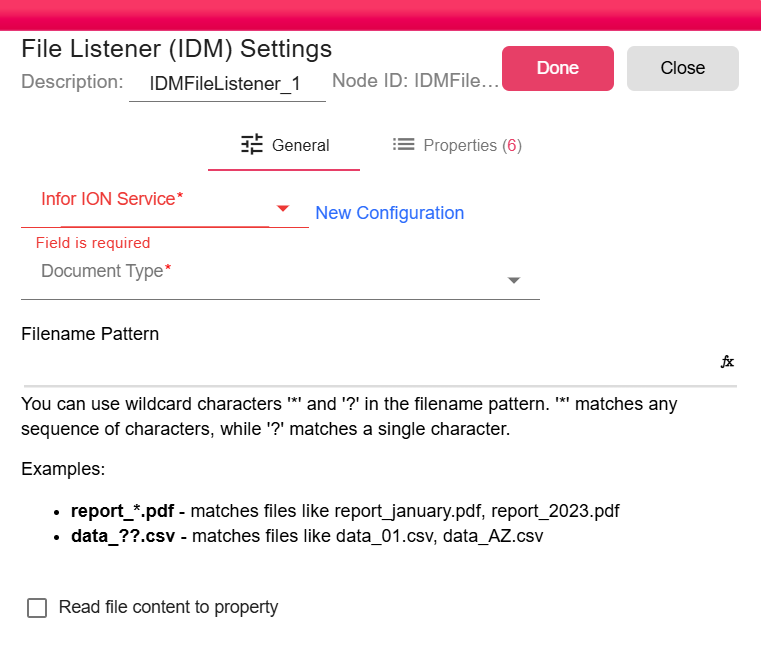
| Field | Description |
|---|---|
| Infor ION Service | Infor ION service used to access IDM. For more, see Infor ION Service. |
| Document Type | IDM document type to monitor. |
| Filename Pattern | Optional filename pattern. * matches multiple characters and ? matches one character. |
| Read file content to property | Stores supported file content in IDM_FILE_LISTENER_CONTENT. |
Outputs
| Output | Data Type | Collection | Description |
|---|---|---|---|
| NewFile | NodeFile | False | The trigger outputs a NodeFile for each matching IDM resource. |
Properties
| Property | FlowDataType | Description |
|---|---|---|
| IDM_FILE_LISTENER_ITEM_PID | String | IDM item PID |
| IDM_FILE_LISTENER_RESOURCE_NAME | String | Resource name |
| IDM_FILE_LISTENER_LAST_CHANGED_TS | String | Last changed timestamp |
| IDM_FILE_LISTENER_CREATED_TS | String | Created timestamp |
| IDM_FILE_LISTENER_ITEM_INFO | JsonNode | Full IDM item information |
| IDM_FILE_LISTENER_CONTENT | String | The file content inside a property |
Processing Logic
The trigger builds an IDM query for the selected document type and optional filename pattern. On the first run, it queries matching resources ordered by LASTCHANGEDTS. On later runs, it queries only resources newer than the stored last changed timestamp. Files are downloaded and emitted sequentially; after a successful non-manual iteration, the stored timestamp is updated.
Examples
report_*.pdfmatches files such asreport_january.pdfandreport_2023.pdf.data_??.csvmatches files such asdata_01.csvanddata_AZ.csv.
Notes / Limitations
- The trigger requests up to 10 IDM items per polling run.
- Manual runs do not update the stored timestamp.
- File content is only stored as a property when the option is enabled and the file type can be read safely.