Infor DataFabric Trigger
Overview
The Infor DataFabric Trigger polls Infor DataFabric for new data objects for a selected object name and starts workflow iterations with the changed data as a DataFrame.
Purpose
Use this trigger when a workflow needs to react to changes in an Infor DataFabric object and process the changed records as tabular data.
Configuration
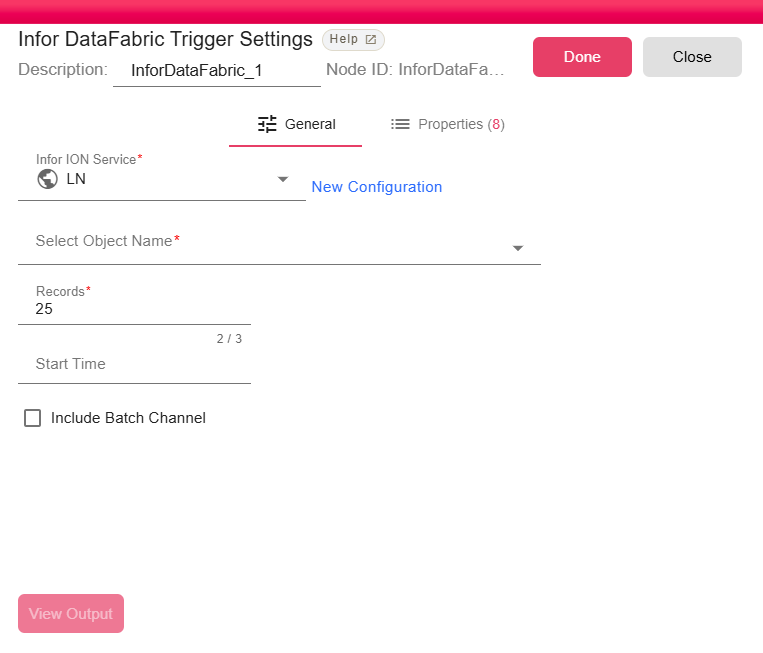
| Field | Description |
|---|---|
| Infor ION Service | Infor ION service used to access DataFabric. The service must have DataFabric access. For more, see Infor ION Service. |
| Select Object Name | DataFabric object to monitor. The list is loaded from the connected Infor environment. |
| Records | Maximum number of records to process per trigger activation. Defaults to 25. |
| Start Time | Optional start time in yyyy-MM-dd HH:mm:ss format. It is converted to UTC before querying DataFabric. |
| Include Batch Channel | Includes batch channel objects. When disabled, batch channel objects are skipped. |
Outputs
| Output | Data Type | Collection | Description |
|---|---|---|---|
| output | DataFrame | False | The trigger outputs a DataFrame containing records from the DataFabric object payload. |
Properties
| Property | FlowDataType | Description |
|---|---|---|
| DL_ID | String | Data object id. |
| DL_CHARSET | String | Character set used for the payload. |
| DL_DOCUMENT_NAME | String | DataFabric document name. |
| DL_LAST_TIME | String | Last stored event time before the current item. |
| VARIATION_FIELD | String | The field name which holds the variation number |
| ITEM_INDEX | Integer | The current item index being processed |
| ITEMS_TOTAL | Integer | The total items being processed in this batch |
| VARIATION_DATA_TYPE | String | The data type of the variation field |
Processing Logic
The trigger queries DataFabric for the selected object name, using event_date as the incremental cursor. It retrieves data objects in ascending event date order, downloads and decompresses payloads when needed, validates or fetches the Data Catalog schema, converts each payload to a DataFrame, and stores the latest event date after successful non-manual processing.
Manual runs process a single stream-channel item and do not update the stored cursor.
Examples
Monitor CustomerParty to process customer changes or SalesOrder to trigger downstream order synchronization.
Notes / Limitations
Start Timemust useyyyy-MM-dd HH:mm:ss; invalid values stop the trigger with a configuration error.- DataFabric objects from the
ionchannel are skipped. batchchannel objects are skipped unless Include Batch Channel is enabled.- Corrupt DataFabric objects emit an iteration warning after processing.