Infor LN Data Trigger
note
Beta This trigger is currently in Beta. Configuration and behavior may change in future releases.
Overview
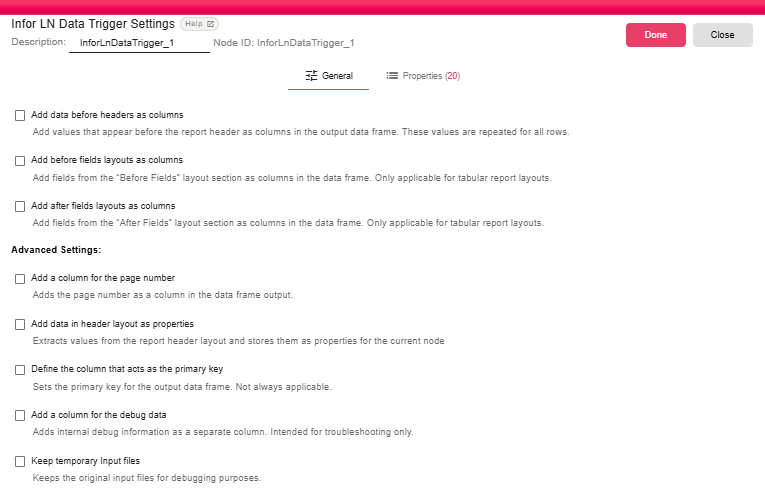
The Infor LN Data Trigger receives an Infor LN report print request through the B2Win Suite device and converts the incoming XML report into a DataFrame.
Purpose
Use this trigger when report rows should be processed as structured data, such as filtering, joining, aggregating, or exporting report data with downstream transformation nodes.
This trigger is the data-focused counterpart to the Infor LN Document Trigger, which produces a PDF document.
Configuration
| Field | Description |
|---|---|
| Add data before headers as columns | Repeats values that appear before the report header as DataFrame columns. |
| Add before fields layouts as columns | Adds fields from the "Before Fields" layout as repeated columns. |
| Add after fields layouts as columns | Adds fields from the "After Fields" layout as repeated columns. |
| Add a column for the page number | Adds the source page number as a DataFrame column. |
| Add data in header layout as properties | Stores header layout values as node properties. |
| Define the column that acts as the primary key | Adds primary key metadata where applicable. |
| Add a column for the debug data | Adds internal debug data as a troubleshooting column. |
| Keep temporary Input files | Keeps temporary XML input files after processing for troubleshooting. |
Outputs
| Output | Data Type | Collection | Description |
|---|---|---|---|
| DataFrame | DataFrame | False | The trigger outputs a DataFrame containing parsed rows from the incoming Infor LN report. |
Properties
| Property | FlowDataType | Description |
|---|---|---|
| X-API-KEY | String | |
| X-SIGN-DATE | String | |
| REPORT_ID | String | Report Code |
| REPORT_USER | String | Report User |
| REPORT_DATE | String | Report Date |
| REPORT_DESCRIPTION | String | Report Description |
| REPORT_LANG | String | Report Language |
| REPORT_FONT | String | Report Font |
| REPORT_FORMATS | JsonNode | Report Formats |
| REPORT_TOTAL_ROWS | Integer | Total Rows |
| REPORT_TOTAL_CELLS | Integer | Total Cells |
| REPORT_TOTAL_PAGES | Integer | Total Pages |
| CRONJOB | Boolean | From cronjob? |
| LANG_ID | String | Language id from the request. |
| COMPANY | String | Company value from the request. |
| LOGIN_USERNAME | String | Logged in user |
| REMOTE_SYSTEM | String | |
| REMOTE_CMD | String | |
| REMOTE_ACTION | String | |
| REMOTE_MODE | String |
Processing Logic
- A user or automated process prints a report to the B2Win Suite device from Infor LN.
- The B2Win Suite server receives the print job and routes it to the matching workflow containing this trigger.
- The trigger parses the incoming request and validates the API signature in production.
- The XML report is parsed into a tabular DataFrame using the configured layout options.
- Report properties and input properties are added to the iteration.
- A new workflow iteration is created with the DataFrame as the trigger output.
Examples
Use this trigger to transform an Infor LN report into a DataFrame, then connect nodes such as Query In-Memory, Order By, Export Table, or database destinations.
Notes / Limitations
- This trigger is currently beta.
- The output schema depends on the report XML layout and selected parsing options.
- The trigger fails if no tables are found in the XML report.
- Temporary XML files are deleted after successful processing unless Keep temporary Input files is enabled.
Related Triggers
| Trigger | Output Type | Use When |
|---|---|---|
| Infor LN Document Trigger | NodeFile (PDF) | You need to process or distribute the report as a formatted document |
| Infor LN Data Trigger | DataFrame | You need to process the report's data rows programmatically |
| Infor LN Split Document Trigger | NodeFile (PDF per recipient) | You need to split the report into individual PDFs per business partner |