Infor LN Document Trigger
Overview
The Infor LN Document Trigger receives an Infor LN report print request through the B2Win Suite device and converts the incoming XML report into a PDF document.
Purpose
Use this trigger when an Infor LN report should start a workflow and continue downstream as a generated PDF file.
Configuration
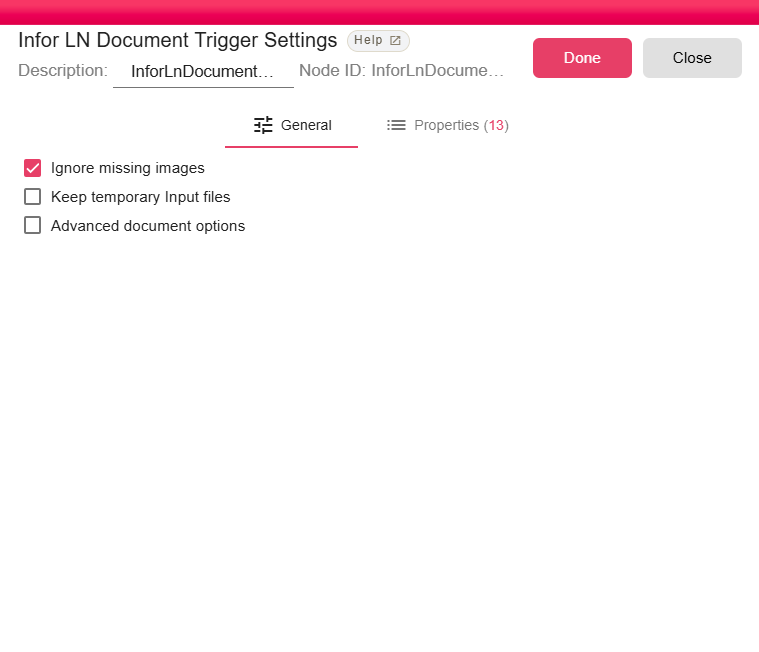
| Field | Description |
|---|---|
| Ignore missing images | Continues rendering when referenced images are missing. Enabled by default. |
| Keep temporary Input files | Keeps temporary XML input files after processing for troubleshooting. |
| Advanced document options | Shows advanced PDF rendering options. |
| Render XML colors in the output document | Renders color information from the XML input. Enabled by default. |
Outputs
| Output | Data Type | Collection | Description |
|---|---|---|---|
| XMLFile | NodeFile | False | The trigger outputs a NodeFile containing the generated PDF document. |
Properties
| Property | FlowDataType | Description |
|---|---|---|
| X-API-KEY | String | API Key |
| X-SIGN-DATE | String | Sign Date |
| REPORT_ID | String | Report Code |
| REPORT_DESCRIPTION | String | Report Description |
| CRONJOB | Boolean | From cronjob? |
| LANG_ID | String | Language ID |
| COMPANY | String | Company |
| LOGIN_USERNAME | String | Logged in user |
| REMOTE_SYSTEM | String | Remote System |
| REMOTE_CMD | String | Remote Command |
| REMOTE_ACTION | String | Remote Action |
| REMOTE_MODE | String | Remote Mode |
| XML_FILE_NAME | String | XML File Name |
Processing Logic
The trigger parses the incoming Infor LN request payload, validates the API signature in production, processes the XML report with document splitting disabled, renders the PDF, and emits the PDF as a NodeFile.
Examples
Use this trigger for standard Infor LN report output workflows, such as generating a PDF invoice, order confirmation, or operational report for delivery by email or storage nodes.
Notes / Limitations
- Temporary XML files are deleted after successful processing unless Keep temporary Input files is enabled.
- Use Infor LN Data Trigger when the report should become tabular data instead of a PDF.