Query Trigger
Overview
The Query Trigger polls a database and starts a workflow iteration when new rows are available. It tracks the highest value found in a configured field and emits only rows newer than the stored value.
Purpose
Use this trigger to react to new or updated records in a database table, such as orders, invoices, audit events, or status changes.
Configuration
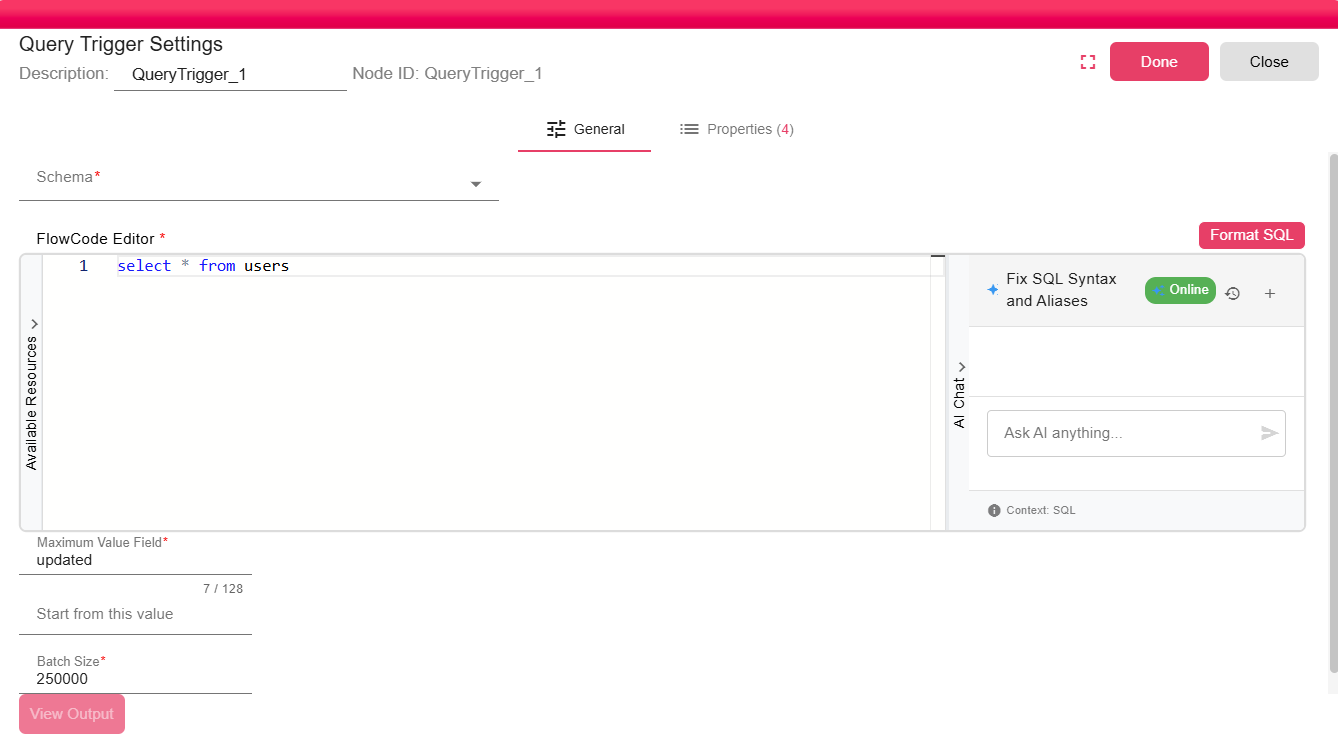
| Field | Required | Description |
|---|---|---|
| Database Schema | Yes | The database connection to query. Must be a configured DB Connection. |
| SQL Query | Yes | The SQL SELECT statement to execute. Should return the data you need, including the tracking field. The query can reference properties using ${propertyName} expressions. |
| Maximum Value Field | Yes | The name of the column used to track progress. Must be a column that increases monotonically with new records (for example, ID, CREATED_AT, MODIFIED_DATE). |
| Start from this value | No | An initial value for the maximum field. On first run, only records with a tracking field value greater than this are returned. If left empty, all existing records are returned on the first run. |
| Batch Size | Yes | The maximum number of records to return per trigger activation. Prevents the trigger from processing an excessive number of records in a single iteration. |
Outputs
| Output | Data Type | Collection | Description |
|---|---|---|---|
| QueryTriggerData | DataFrame | False | The trigger outputs a DataFrame containing the new records found since the last run. The DataFrame is passed to the first connected downstream node. |
Properties
| Property | FlowDataType | Description |
|---|---|---|
| SQL_COUNT_STATEMENT | String | The SQL statement used to count matching rows and find the next maximum value. |
| SQL_SELECT_STATEMENT | String | The full SQL statement that was executed |
| RESULTS_FROM_VALUE | String | The previous maximum value used as the lower bound. |
| RESULTS_TO_VALUE | String | The new maximum value used as the upper bound. |
Processing Logic
- The trigger evaluates the configured SQL query.
- It builds a count query that selects the configured Maximum Value Field and applies a
>condition from the stored maximum value. - It limits the batch when supported by the database driver.
- If rows are found, it emits a DataFrame for values greater than the previous maximum and less than or equal to the new maximum.
- After the iteration succeeds, it stores the new maximum value.
Manual runs use the configured Start from this value but do not update the stored maximum value.
Examples
To process new orders, configure a query that returns order rows and set Maximum Value Field to an increasing UPDATED_AT or ID column.
SELECT id, customer_code, total_amount, updated_at
FROM orders
WHERE status = 'READY'
Notes / Limitations
- The trigger stores the last maximum value in persistent state so it survives workflow restarts and server reboots.
- If the tracked field can have duplicate values or is not strictly increasing, records can be missed or reprocessed.
- The processor automatically adds ordering and range conditions for the maximum value field.
- Avoid adding your own
LIMIT; the processor adds or replaces result limits where the database supports them. - The polling cadence is controlled by the workflow trigger execution settings.