Scheduler
Overview
The Scheduler trigger starts workflow iterations from a cron expression. It runs as a threaded trigger and can also be executed manually from the trigger controls.
Purpose
Use Scheduler when a workflow must run repeatedly, such as every night, every hour, or on a specific weekday.
Configuration
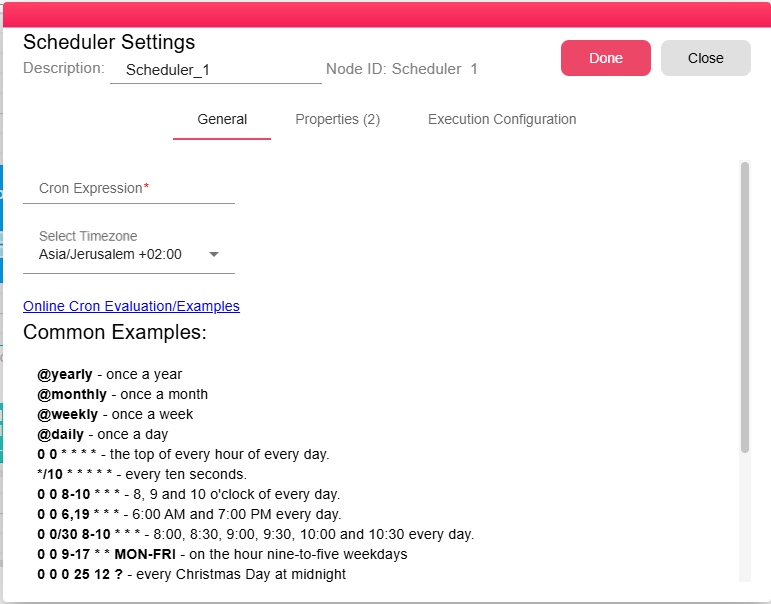
| Field | Description |
|---|---|
| Cron Expression | The schedule definition using cron syntax. Required. |
| Timezone | The timezone used to evaluate the cron expression. If it is not set, the workflow timezone is used. |
Properties
| Property | FlowDataType | Description |
|---|---|---|
| SCHEDULER_TIME | LocalDateTime | The scheduled due time for the iteration. |
| SCHEDULER_MANUALLY | Boolean | true when the iteration was started manually, otherwise false. |
Processing Logic
The trigger stores the last scheduler run time and calculates the next due time from the cron expression. When the next due time has passed, it emits a new iteration and advances the stored time.
In production mode, the trigger skips a due time if it is older than the configured expiry window. The backend default is 30 minutes. Manual runs do not wait for the cron expression.
Examples
Cron Expression Syntax
B2Win Suite uses a 6-field Spring-style cron format:
┌─────────── second (0–59)
│ ┌─────────── minute (0–59)
│ │ ┌─────────── hour (0–23)
│ │ │ ┌─────────── day of month (1–31)
│ │ │ │ ┌─────────── month (1–12 or JAN–DEC)
│ │ │ │ │ ┌─────────── day of week (0–7 or SUN–SAT; 0 and 7 are Sunday)
│ │ │ │ │ │
* * * * * *
Shorthand Macros
| Macro | Equivalent | Description |
|---|---|---|
@yearly | 0 0 0 1 1 * | Once a year, midnight January 1st |
@monthly | 0 0 0 1 * * | Once a month, midnight on the 1st |
@weekly | 0 0 0 * * 0 | Once a week, midnight on Sunday |
@daily | 0 0 0 * * * | Once a day at midnight |
Common Schedules
| Expression | Schedule |
|---|---|
0 0 * * * * | Top of every hour |
*/10 * * * * * | Every 10 seconds |
0 0 8-10 * * * | 8:00, 9:00, and 10:00 every day |
0 0 6,19 * * * | 6:00 AM and 7:00 PM every day |
0 0/30 8-10 * * * | Every 30 minutes between 8:00 and 10:30 |
0 0 9-17 * * MON-FRI | On the hour, 9 AM-5 PM, weekdays only |
0 0 0 25 12 ? | Midnight on Christmas Day |
0 0 0 L * * | Last day of every month at midnight |
0 0 0 1W * * | First weekday of the month at midnight |
0 0 0 ? * 5L | Last Friday of the month at midnight |
0 0 0 ? * MON#1 | First Monday of the month at midnight |
For an interactive cron builder and validator, visit https://crontab.cronhub.io/.
Notes / Limitations
- In development mode, the scheduler fires while the builder execution is active.
- In production mode, the scheduler runs continuously as long as the execution is active.
- Missed runs older than the expiry window are skipped.
- Multiple scheduler triggers can be added to different paths within the same workflow, each with its own schedule.