File Listener (SharePoint)
Overview
The File Listener (SharePoint) trigger monitors a SharePoint document library and starts workflow iterations for new or changed files that match the configured path.
Purpose
Use this trigger when files arrive or change in SharePoint and must be downloaded into a workflow automatically.
Configuration
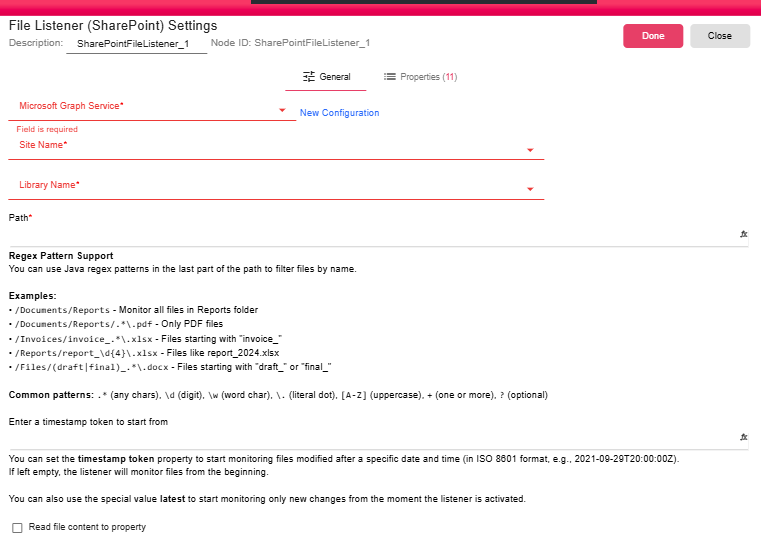
| Field | Description |
|---|---|
| Microsoft Graph Service | Service connection used to access SharePoint. For more, see Microsoft Graph Service. |
| Site Name | SharePoint site to monitor. |
| Library Name | Document library to monitor. |
| Path | Folder path within the library. The last path segment can be a Java regex pattern to filter file names. |
| Timestamp Token | Optional starting delta token. Use an ISO 8601 timestamp such as 2021-09-29T20:00:00Z, or latest to start from the current point. |
| Read file content to property | Stores supported file content in SHARE_POINT_FILE_LISTENER_CONTENT. |
Outputs
| Output | Data Type | Collection | Description |
|---|---|---|---|
| ChangedFile | NodeFile | False | The trigger outputs a NodeFile for each matching changed SharePoint file. |
Properties
| Property | FlowDataType | Description |
|---|---|---|
| SHARE_POINT_FILE_LISTENER_INFO | JsonNode | File metadata |
| SHARE_POINT_FILE_LISTENER_NAME | String | File name |
| SHARE_POINT_FILE_LISTENER_PATH | String | File path |
| SHARE_POINT_FILE_LISTENER_SIZE | Long | File size in bytes |
| SHARE_POINT_FILE_LISTENER_LAST_MODIFIED | Long | Last modified timestamp |
| SHARE_POINT_FILE_LISTENER_CREATED | Long | Created timestamp |
| SHARE_POINT_FILE_LISTENER_ITEM_ID | String | SharePoint item ID |
| SHARE_POINT_FILE_LISTENER_ETAG | String | ETag |
| SHARE_POINT_FILE_LISTENER_WEB_URL | String | Web URL |
| SHARE_POINT_FILE_LISTENER_DRIVE_ID | String | Drive ID |
| SHARE_POINT_FILE_LISTENER_CONTENT | String | The file content inside a property |
Processing Logic
The trigger uses Microsoft Graph delta changes for the selected site, library, and path. It filters deleted items and folders, applies the optional regex to file names, downloads each matching file, and emits files sequentially. After a successful non-manual batch, it stores the delta token and clears processed item tracking.
Examples
/Documents/Reportsmonitors all files in the Reports folder./Documents/Reports/.*\.pdfmonitors only PDF files./Invoices/invoice_.*\.xlsxmonitors Excel files starting withinvoice_./Reports/report_\d{4}\.xlsxmatches files such asreport_2024.xlsx./Files/(draft|final)_.*\.docxmatches Word files starting withdraft_orfinal_.
Notes / Limitations
- The regex applies to the file name portion after the monitored folder path.
- Manual runs do not commit the delta token.
- File content is only stored as a property when the option is enabled and the file type can be read safely.