Overview
What is the Workflow Builder?
The Workflow Builder is the visual design surface where you create, configure, and test-run a workflow. A workflow is built by adding nodes to the canvas, connecting them into one or more paths, and configuring how data should be read, transformed, and delivered.
It is primarily used by developers who design and maintain business processes inside B2Win Suite. The builder provides a visual way to work with workflows — instead of writing the full process as code, you assemble the workflow from nodes, define how they connect, and monitor executions directly from the same screen.
Main Components
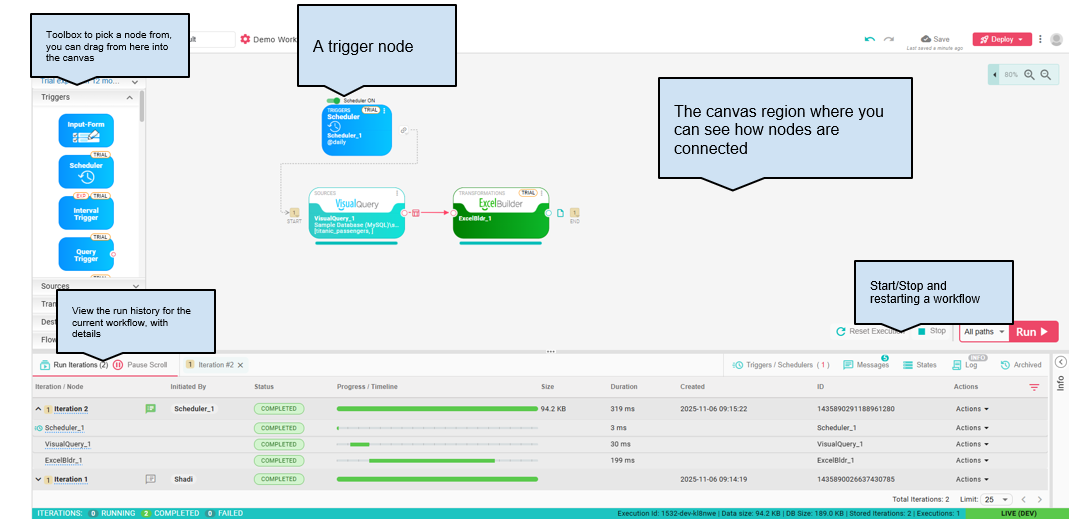
The main areas of the Workflow Builder are:
- Nodes Toolbox — The left panel lists all available nodes grouped by category (Triggers, Sources, Transformations, Destinations, Flow Controls). Drag a node from the toolbox onto the canvas to add it to your workflow.
- Trigger Node — A trigger starts a workflow iteration when its conditions are met (for example, a schedule, a new file, or an HTTP request).
- Canvas — The center area where you place nodes and connect them to define the workflow's execution path.
- Run Controls — The controls at the lower right let you run, stop, or reset the workflow execution.
- Bottom Panel — Shows workflow iterations, execution status, duration, logs, node outputs, and other runtime details.
Together these components let you design the workflow structure, execute it, and review results from one place.
Key Concepts
- Node — A single processing unit. Each node has a type, a configuration dialog, and one or more input/output ports.
- Connection — A link between two nodes' ports that defines the data flow direction.
- Iteration — One complete run of the workflow from trigger to completion. Multiple iterations can run in parallel.
- Execution — The long-running process that manages triggers and coordinates iterations for a workflow. Each open workflow has one active execution.
- Path — An independent chain of connected nodes on the canvas. A single workflow can contain multiple paths running concurrently.
See Terminology for a full glossary.
Workflow Lifecycle Summary
- Create a workflow in the Workflow Manager.
- Design it on the canvas by adding and connecting nodes.
- Test by running it from the builder and reviewing iteration results.
- Deploy to make it available in the production environment.
- Publish to expose it to end users in the library.
- Monitor ongoing executions from the Workflow Manager.
Related Sections
- Canvas — How to add nodes, make connections, and use canvas tools
- Workflow Execution — Iterations, paths, partial execution, and logs
- Properties & States — Passing data between nodes
- Deployment & Publishing — Making workflows available in production
- Nodes — Reference documentation for every node type