Permissions
The Permissions tab controls which users or groups can perform specific actions on this workflow. By default, every workflow inherits the system-level permission configuration.
Inherited vs. Custom Permissions
To view the default permission rules, leave the Inherit checkbox checked. The system-wide defaults are shown as read-only.
To define custom permissions for this specific workflow, uncheck Inherit:
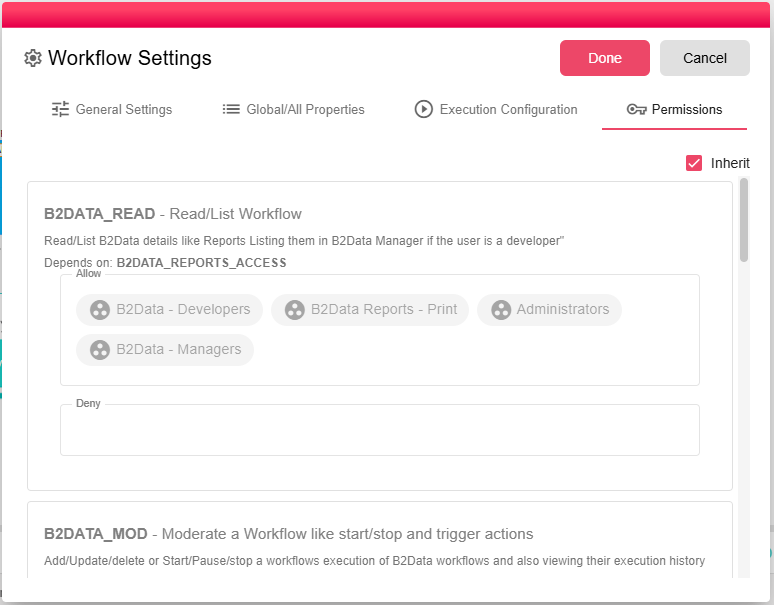
Once inheritance is disabled, you can configure each permission independently for this workflow. Any changes here apply only to this workflow and do not affect other workflows or the system defaults.
Permission Subjects
Each permission row describes a specific action. A description is shown beneath each item explaining exactly what it controls:
| Permission | Description |
|---|---|
| WORKFLOW_READ | Who can view this workflow and its configuration |
| WORKFLOW_MOD | Who can open the workflow in the builder and modify it |
| WORKFLOW_CHGPERM | Who can change the permissions of this workflow |
| WORKFLOW_EXECUTE | Who can manually execute or trigger this workflow |
| WORKFLOW_EXPORT | Who can export this workflow |
| WORKFLOW_DEPLOY | Who can deploy or undeploy this workflow to production |
Assigning Permissions
For each permission subject, you can assign access to:
- All Users — Any authenticated user
- Specific User Groups — One or more user groups (for example, Administrators, Developers, Managers)
Changes take effect immediately after saving the workflow settings.
Relationship to System-Level ACL
Workflow-level permissions work in conjunction with the system-level Access Control List (ACL). A user must satisfy both the system-level ACL rules and the workflow-level permissions to perform an action.