
For over 50 years, SQL has been one of the most enduring and widely used languages for working with data across enterprise systems. Whether pronounced S-Q-L or “sequel,” it serves as the standard language for retrieving, combining, filtering, and transforming data—as well as managing and updating records.
SQL continues to be the primary method for accessing data in Infor environments, including cloud deployments. In Infor CloudSuite, data is made available through Infor Data Lake for reporting and analysis. While Data Lake is built on object storage rather than a traditional relational database, Infor provides a JDBC interface that enables SQL-based access. In addition, many Infor customers replicate CloudSuite data into relational databases-making SQL essential across these environments.
In B2Win Suite, we take a unique approach to SQL. As a low-code platform, B2Win Suite goes beyond using SQL just for data retrieval, enabling users to manipulate and act on data directly within the system. To make SQL more accessible, we provide visual tools and AI agents that simplify query creation and usage – reducing the barrier for non-technical users, while still supporting advanced use cases.
With AI agent-driven SQL generation, the process becomes even more intuitive. Instead of relying on structured syntax like “SELECT…FROM…WHERE,” users can describe what they need in natural language, and the system generates the SQL automatically.
The beauty of B2Win Suite’s AI lies in its context-awareness. It understands the underlying data model—tables, fields, and their meaning within an ERP environment—allowing it to generate accurate SQL based on metadata and structural context.
This approach helps maintain data security while still delivering precise and relevant results.This represents a fundamentally new way of working with data—bridging the gap between ease of use and full flexibility, and unlocking the full power of SQL.
In this article, we’ll explore how B2Win Suite empowers users with a complete set of SQL-driven tools to access, shape, and activate their data.
1 – Build Queries Visually—No SQL Required
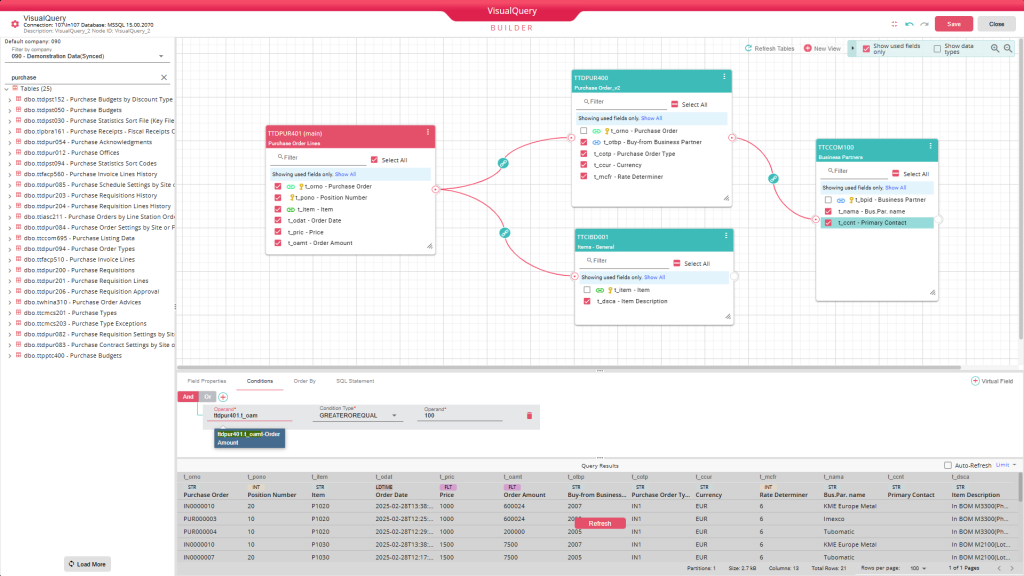
Instead of writing SQL, users can build queries visually—selecting tables, choosing fields, and applying filters with just a few clicks. This is made even easier through a dedicated Infor data dictionary layer, along with integrated search and preview tools. It’s the fastest way to go from question to insight, especially for those who don’t work with SQL every day.
2 – Full SQL Control for Advanced Data Exploration
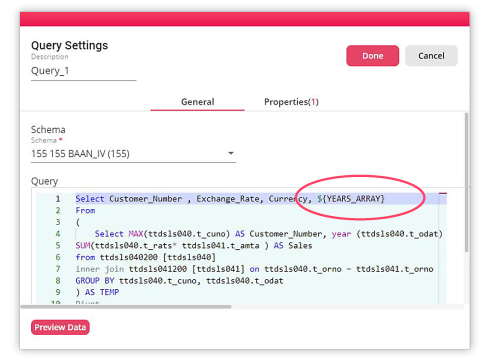
When precision matters, nothing beats writing SQL directly. The Query tool gives power users full control to shape exactly how data is retrieved, combined, and filtered. It’s where complex logic, performance tuning, and deep data exploration come together. If you have your query ready from another system, you can simply copy and paste it to start getting results.
3 – Turn Queries into Interactive Experiences with Dynamic Inputs
Data is rarely static and neither are the questions behind it. With simple “from” and “to” inputs, easily selected through zoom-to-table, along with other parameterized values, queries become interactive tools, empowering end users to shape results dynamically – without ever touching the underlying SQL.
These input forms can also be exposed as deep hyperlinks with parameters, allowing them to be triggered directly from outside the B2Win Suite platform. This enables embedding reports into operational systems and makes it easy to move from context to insight in a single step.
4 – Combine SQL queries and scripting
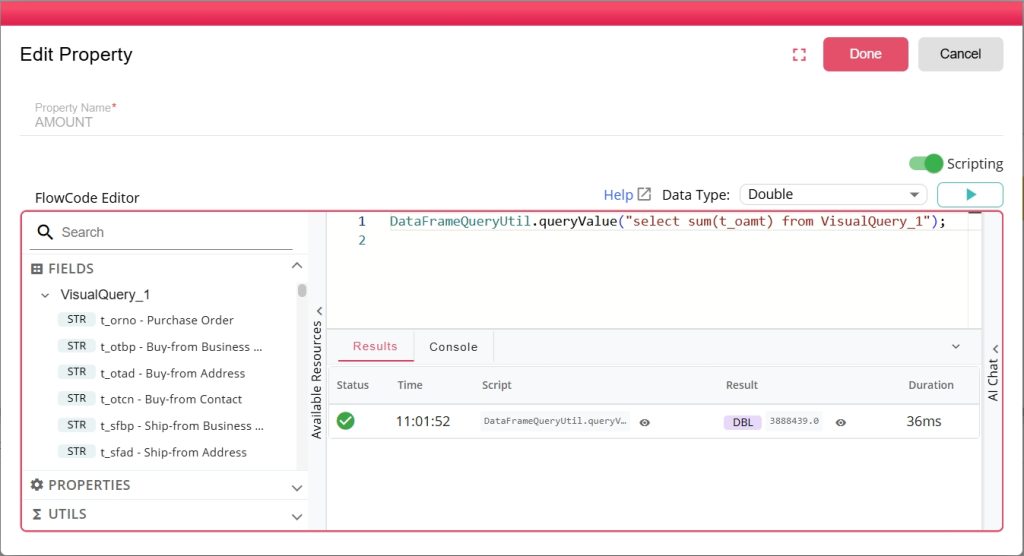
SQL is declarative – it defines what you want. Scripting is procedural—it defines how to do it. B2Win Suite brings both approaches together within a single low-code platform. It combines procedural scripting with declarative SQL, allowing users to build flexible, end-to-end workflows. Some nodes operate procedurally, others declaratively—and they can be seamlessly integrated. Within a script, you can execute SQL against any database or query in-memory data frames, blending logic and data access in a single flow.
All of this is powered through the FlowCode Editor, which includes an AI agent for scripting and code generation, auto-complete, console logging, and a modern interface. The built-in sidebar—featuring fields, properties, utilities, and snippets—not only accelerates development but also provides the context for AI agent-assisted scripting, enabling more accurate and relevant code generation while accelerating workflow development.
5 – Continuously Capture What’s New with Incremental Query Triggers
Sometimes, the requirement goes beyond querying data—it’s about continuously tracking what’s new. Query Trigger enables incremental data retrieval by monitoring a specific field, such as an ID or timestamp, and keeping track of its maximum value.
Each time the trigger runs, it executes the defined query but returns only records where that field exceeds the previously stored maximum. As new records are added, the trigger automatically initiates the next iteration, ensuring that only new data is processed.

The result is an efficient, continuous data flow — output directly into a data frame — without reprocessing existing records.
6 – Transform Data in Memory with SQL
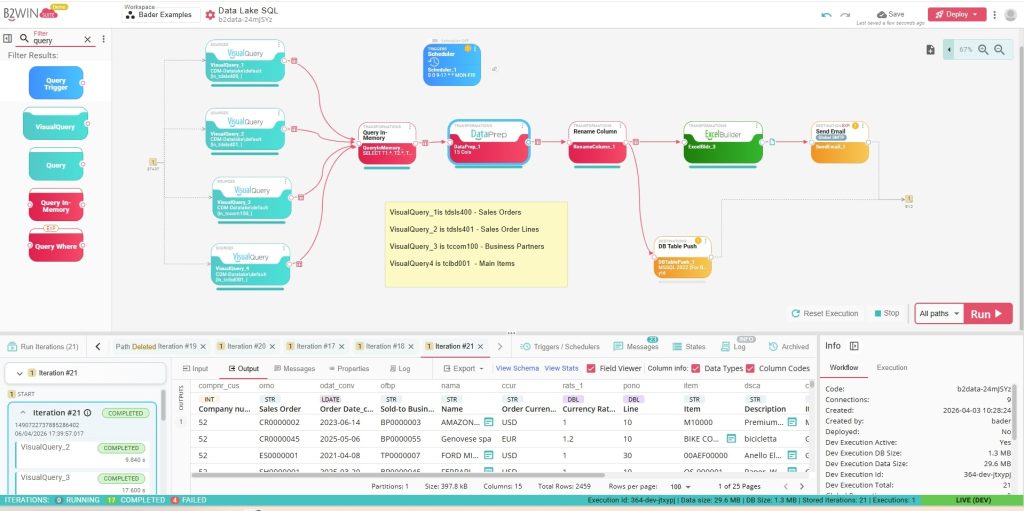
Working with data doesn’t stop at retrieving it—you often need to shape it after retrieval. In B2Win Suite, the DataPrep node provides a graphical way to prepare and manipulate data, making it easy to quickly structure and refine datasets visually without writing code.
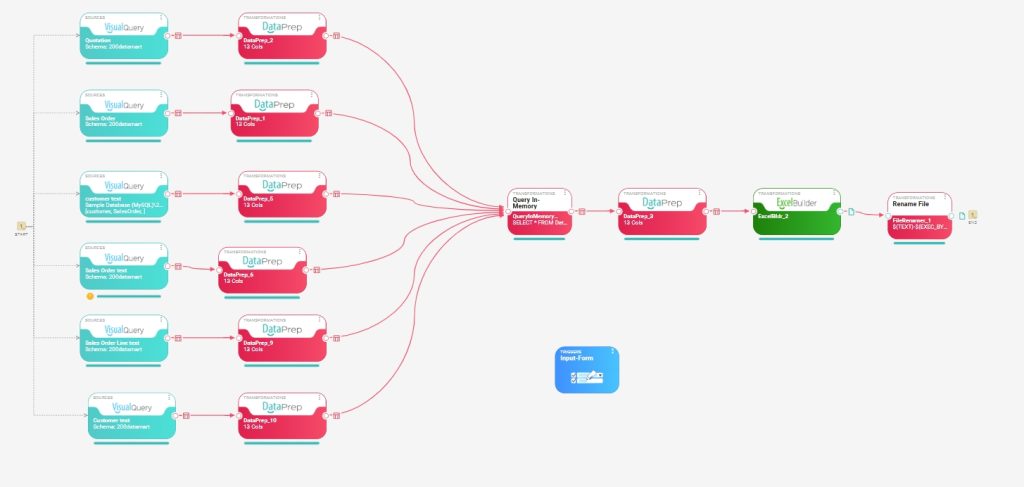
Query in Memory extends this flexibility. Instead of relying solely on predefined transformations, users can run SQL directly on one or multiple in-memory data frames, enabling more advanced logic, deeper transformations, structural changes, and complex aggregations that go beyond typical visual tools.
It is powered through a modern editor with an AI agent for SQL generation, auto-complete, and console logging. The built-in sidebar, featuring fields and properties, can be directly used within queries and provides the context for AI agents, enabling more accurate and relevant code generation while reducing the complexity of advanced data workflows.
Put Your Data into Action Across Systems and Outputs